
|
In VISULOX a text can be sent to users, appended to sessions or needed in workflows. These texts can be composed using the message feature in VISULOX Cockpit / Administration / Text module. A message in VISULOX is a piece of text, which is often used. Each message has a category, where it can be used. |
VISULOX Cockpit / Administration / Text module
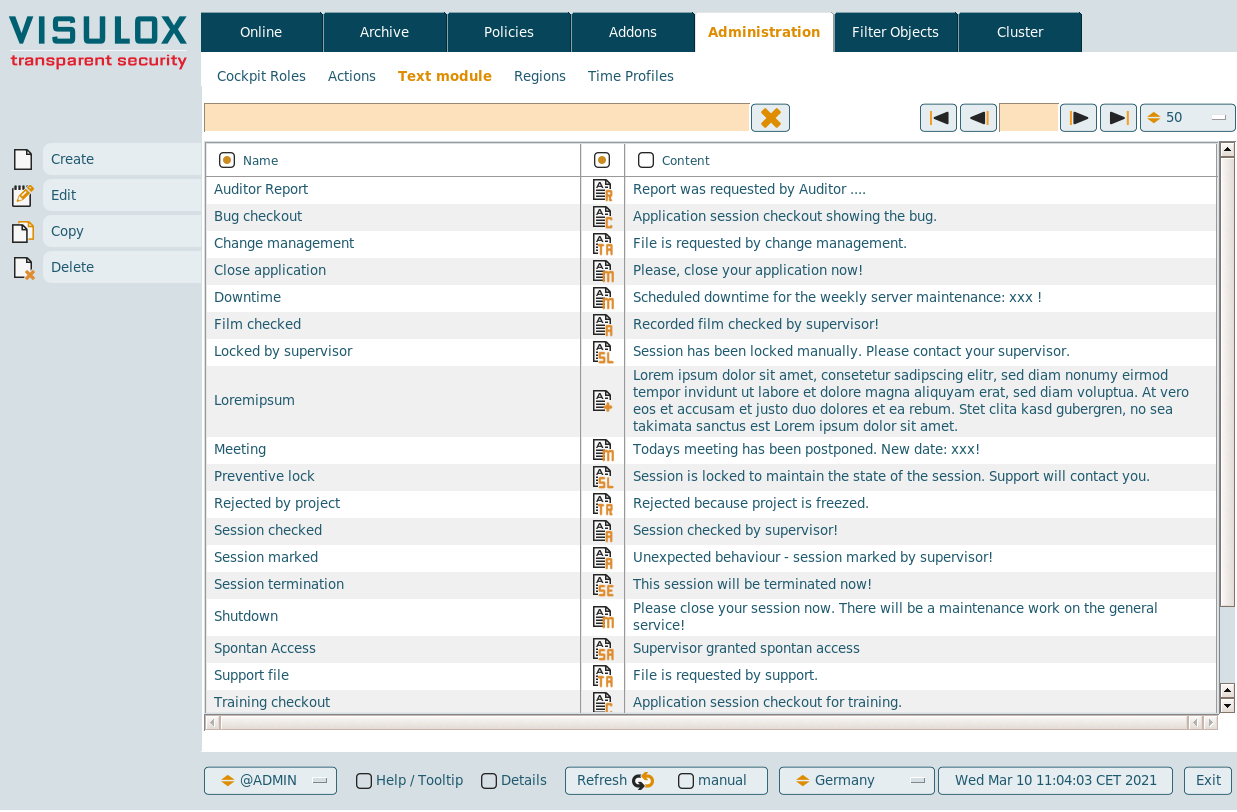
Categories
|
|
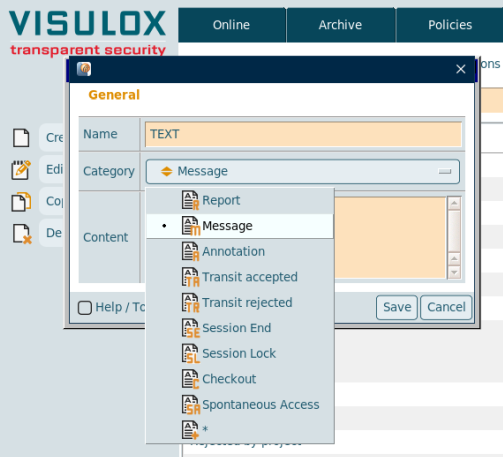
Available predefined messages can be selected via a drop down list.
Allowed tags in messages
|
Modes |
Tag |
|---|---|
|
bold |
<b>text</b> |
|
large |
<l1>text</l1>, <l2>text</l2>, <l3>text</l3> |
|
center |
<center>text</center> |
|
italic |
<i>text</i> |
|
line break |
<br> |
|
horizontal line |
<hr> |
|
link |
<a href="link">link text</a> (Be careful: only one link per line!) |
Configuration parameters
It is possible to configure the minium amount of words and the maximum length of a text for the different messages.
visulox config list -name entry.minwords

    --------------------------------------------------------------
    | changed | key                                    | value   |
    --------------------------------------------------------------
    |         | entry.minwords.access_policy           | default |
    |         | entry.minwords.annotation              | 3       |
    |         | entry.minwords.application_policy      | default |
    |         | entry.minwords.checkout                | 3       |
    |         | entry.minwords.citrixobject_form       | 0       |
    |         | entry.minwords.commandconnect          | default |
    |         | entry.minwords.commandguard            | default |
    |         | entry.minwords.default                 | 0       |
    |         | entry.minwords.external_message_policy | 1       |
    |         | entry.minwords.filetransit             | default |
    |         | entry.minwords.ftapproved              | 3       |
    |         | entry.minwords.ftreject                | 3       |
    |         | entry.minwords.host_object             | default |
    |         | entry.minwords.internal_message_policy | 1       |
    |         | entry.minwords.login_policy            | default |
    |         | entry.minwords.cockpit                 | default |
    |         | entry.minwords.message                 | 3       |
    |         | entry.minwords.region                  | default |
    |         | entry.minwords.resource                | default |
    |         | entry.minwords.script                  | default |
    |         | entry.minwords.script_object           | 1       |
    |         | entry.minwords.sessionend              | default |
    |         | entry.minwords.sessionlock             | default |
    |         | entry.minwords.spontanaccess           | 3       |
    |         | entry.minwords.textblocks              | 3       |
    |         | entry.minwords.timeprofile             | default |
    |         | entry.minwords.transit_policy          | default |
    --------------------------------------------------------------
visulox config list -name  entry.maxlength

    ---------------------------------------------------------------
    | changed | key                                     | value   |
    ---------------------------------------------------------------
    |         | entry.maxlength.access                  | default |
    |         | entry.maxlength.access_policy           | default |
    |         | entry.maxlength.annotation              | default |
    |         | entry.maxlength.application_policy      | default |
    |         | entry.maxlength.checkout                | default |
    |         | entry.maxlength.citrixobject_form       | 2048    |
    |         | entry.maxlength.commandconnect          | default |
    |         | entry.maxlength.commandguard            | default |
    |         | entry.maxlength.default                 | 255     |
    |         | entry.maxlength.external_message_policy | default |
    |         | entry.maxlength.filetransit             | default |
    |         | entry.maxlength.ftapproved              | default |
    |         | entry.maxlength.ftreject                | default |
    |         | entry.maxlength.host_object             | default |
    |         | entry.maxlength.internal_message_policy | default |
    |         | entry.maxlength.login_policy            | default |
    |         | entry.maxlength.cockpit                 | default |
    |         | entry.maxlength.message                 | default |
    |         | entry.maxlength.region                  | default |
    |         | entry.maxlength.resource                | default |
    |         | entry.maxlength.script                  | default |
    |         | entry.maxlength.script_object           | default |
    |         | entry.maxlength.sessionend              | default |
    |         | entry.maxlength.sessionlock             | default |
    |         | entry.maxlength.textblocks              | default |
    |         | entry.maxlength.timeprofile             | default |
    |         | entry.maxlength.transit_policy          | default |
    ---------------------------------------------------------------
Related information
Setting the min/max length for messages, contents and comments