
VISULOX can be installed on virtualized disks on platforms like VMWare.
If such disks are used, it is necessary, that these disks are NOT setup as "thin provisioned".
"Thick provisioning" has to be used instead.
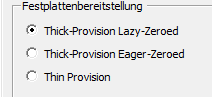
Thin provisioning can not be recognized by VISULOX and will lead to errors like: "No space on device", "Database or disk full" in the logs.
This happens although the operation system is showing, that there is enough disk space via "df" command.
In actual VMware versions it may happen, that thin provisioning is the only available option for disks.
In this case thin provisioning with hard zero has to be chosen.
Checking existing disks in Virtual Machine Properties of VMWare:
