
Host Control (Command Connect / Guard)
Host Connect, consist of two applications named Command Connect and Command Guard that provide a more flexible way to Additionally, Command Guard has command level controls for the application. Remaining faithful to the whole VISULOX concept, no agents are needed on the endpoints to achieve this. |
Overview
VISULOX Command Connect / Guard is a multi functional shell connect client.
Command Connect / Guard has a list of groups containing several host objects, the user can connect to. The connection method can be Telnet, SSH or SSH Keys.
The connection port is configurable via the Host Object addon.
Command Connect / Guard features
- Multiple groups
- Multiple endpoints per group
- Colorized grouping of hosts
- Auto arrange of the connection windows
- Single entry line for selected hosts or a host group
- Black and white command list (CMD Guard only)
- File Transfer to the hosts can be enabled
- User can add hosts by himself (depending on rules)
- Assigned hosts can be combined in a temporary group
- Scripts can be assigned for Command Guard (server-side) (CMD Guard only)
- Additional managed and unmanaged sessions can be started (CMD Connect only)
- Client side SSH Key handling
Command Connect / Guard GUI
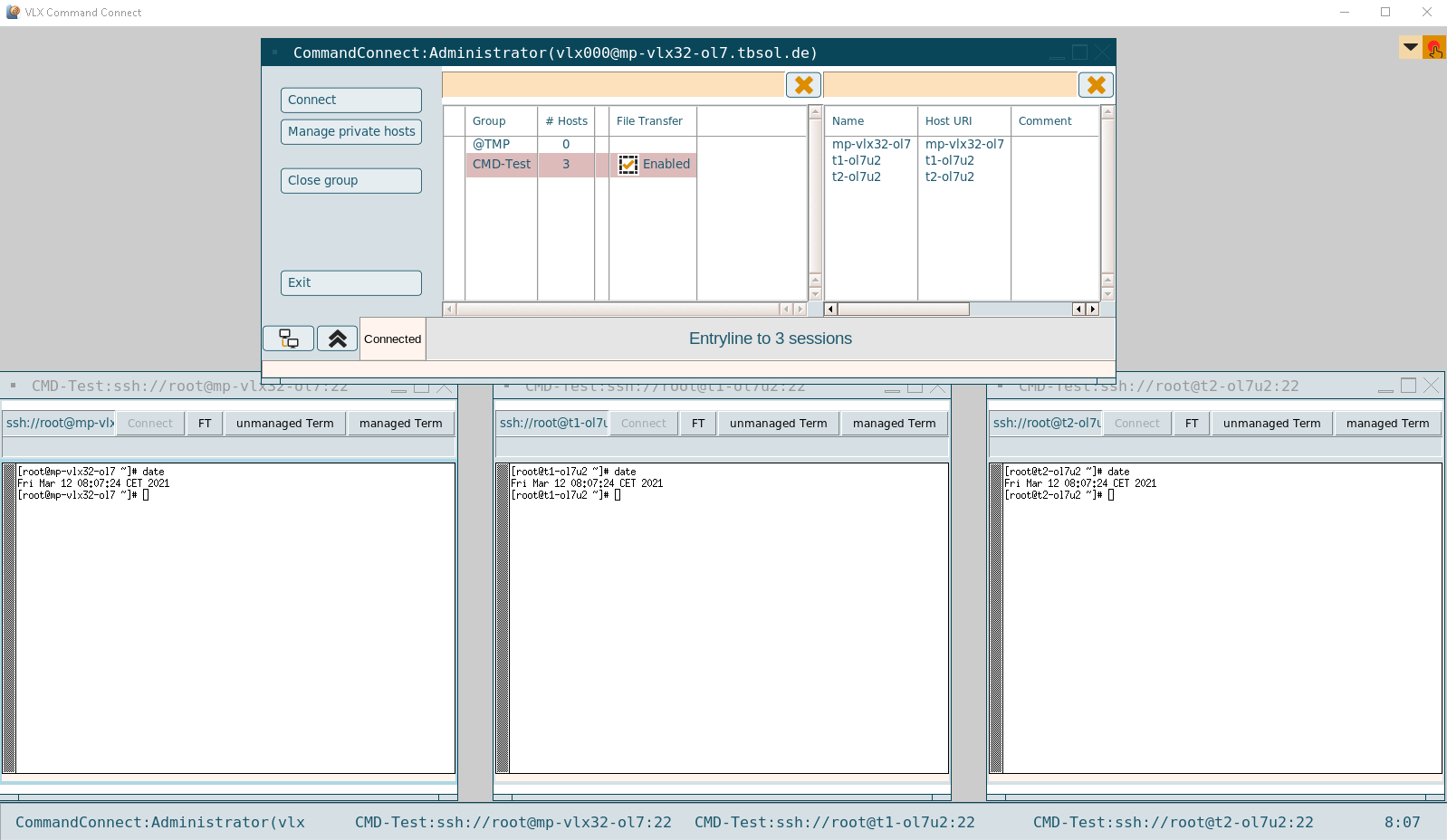
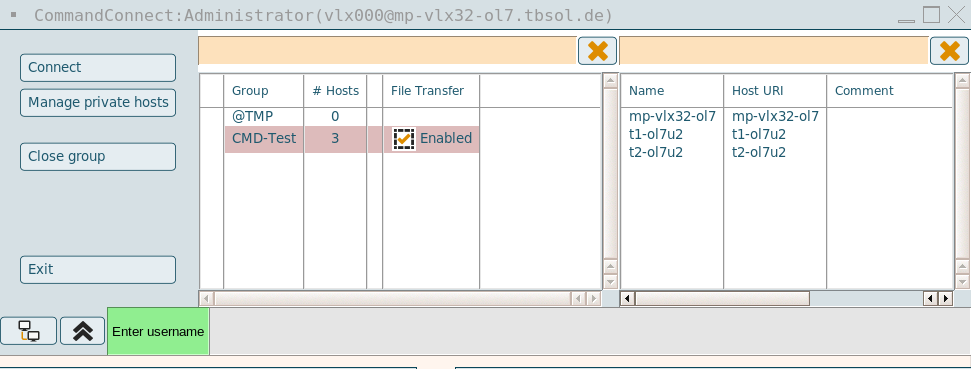
- Connect: Opens a shell to all hosts in the selected group
- Manage private hosts: A user can manage his own hosts
- Close group: All sessions of the selected group will be closed
- Exit: Command Connect / Guard application and all open sessions are closed
- Arrange: Connected session windows will be rearranged based on the first window marked with the colored frame
- Collapse: Collapse Command Connect / Guard Console
- Scripts: Shows all available scripts for this group, a selected script can be applied on all open shells (CMD Guard only). (See also: Script objects)
To send a command to all connected shells, the input field of the Command Connect / Guard application can be used: The status of the connected terminals is also shown.

Each connection window also has its own input field and scripts button, so that commands and scripts can be started only in this shell.
Unmanaged sessions (CMD Connect only)
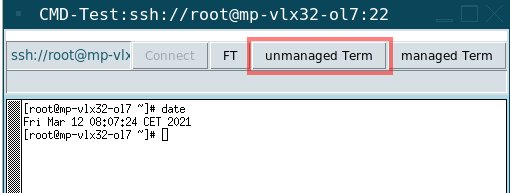
In Command Connect the user has a managed session per host assigned to his Command Connect groups. Additionally the user can open one or more extra managed and unmanaged sessions to this host via the "unmanaged Term" and the "managed Term" button.
The unmanaged sessions are closed together with the managed sessions. They are not taken into account with arrange, they are independent and unmanaged.
Temporary hosts group
With a right click on an assigned host, the host can be added to a temporary group (@TMP).
Hosts can be added from any available groups to combine them in the new @TMP group.
Own hosts
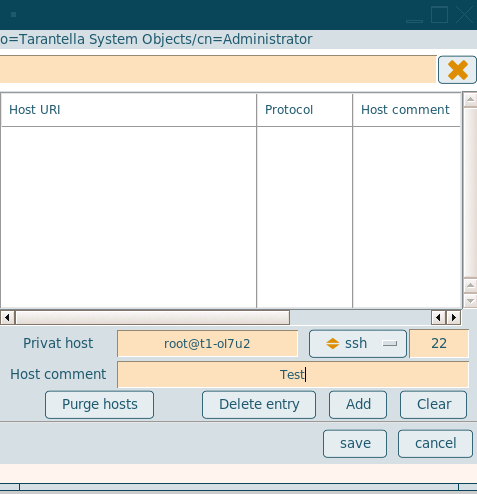
Command Connect / Guard has the ability, that a user can manage his own hosts.
To keep this under control, the admin has to define a ruleset, what kind of hosts a user can add. The ruleset is part of the Command Connect / Guard group.
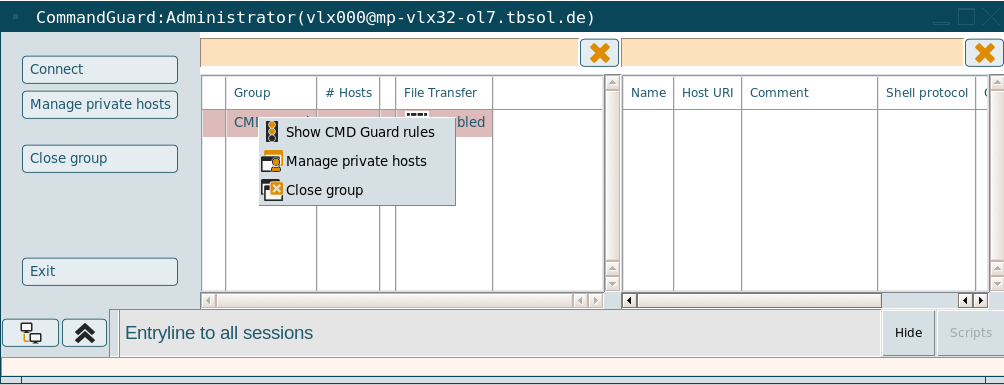
With a right click on a group in Command Connect / Guard, the user can view the Guard rules (Guard only), manage own private hosts (depending on the rules) or close the group.
The private hosts are based on rules, the user is a string and the host is a string or an IP address.
Command Connect / Guard tries to resolve the name, then the rule is checked. If there are private hosts that are no longer valid, because the rule has changed, the invalid hosts can be purged with the "Purge hosts" button. (See also: Private host tool)
File Transfer
If File Transfer is enabled to the host of the connection, an FT button is available to start the FT Client:
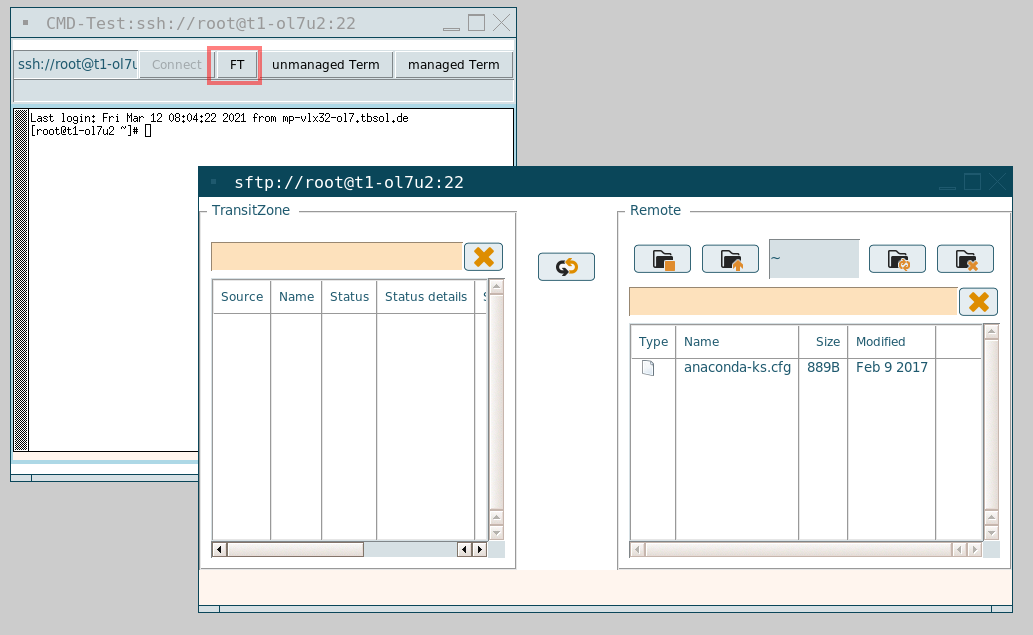
With the FT Client component, the user is able to transfer files between the Transit Zone and the application server according to the underlying File Transit rules. (See also: File Transfer)

For File Transfer within Command Connect MaxSessions in sshd_config on the destination server has to be set at least to 2. With a MaxSession setting of 1 only the FT Client can be used without Command Connect.
Configuration parameters
| Application | Application command | Login script |
|---|---|---|
| Command Connect | vlxcmdconnect | visulox.exp |
| Command Guard | vlxcmdguard | visulox.exp |
The following parameters can be used with Command Connect / Guard:
| Parameter | Description |
|---|---|
| -title <value> | Application title <> (Placeholders are possible1) |
| -groups <value> | Comma seperated list of groups <> |
| -lang <value> | Language <> |
| -scripts <value> | Path to scripts <> |
| -cdm | CDM: mount client drives in home directory for scripts and SSH-keys |
| -guard | Enable to use Command Guard |
| -sshkeymask <value> | SSH-key: mask to select SSH-keyfiles %HOST%, %USER%, %LOGINUSER%,%LOGINUSERID%,%OWNERID%,%GROUP% |
| -sshoptions <value> | SSH: extra options (like -X,-Y). See documentation for more |
| -termoptions <value> | TERM: extra options (like: -termoptions "-fn: 10x20"), more examples2 |
| -resource <value> | Name of passcache resource |
-files <value> | Comma seperated list of definition files <> |
| -hosts <value> | Comma seperated list of hosts <>, e.g. ssh://user@host |
| -autoconnect | Auto connect, if there is only one host |
| -ftoff | Disable usage of FT Client in Term |
| -cmoff | Disable usage of Control Master |
| -prompt <value> | Regexpression for prompt detection. Default: <^.+\$ |^.+#> |
-arranging <value> | Arrangment mode (classic,on,off,fixon,fixoff). Default: <classic> (With fixon/fixoff the user is not able to change the mode.) |
| -iconify <value> | Iconfy mode (classic,on,off,fixon,fixoff). Default: <classic> |
-sshpassprompt <value> | Override default sshpass password prompt. See: "man sshpass -P" |
| -doubleclickoff | Disable double click action on host group selection |
1 Placeholders for the title can also be set with the configuration parameter: guidefaults.title
2 More examples for the -termoptions parameter: "-fg <color>", "-bg <color>", "-leftbar", "-rightbar", "-title", "-/+fullscreen", etc
Command Connect / Guard can be controlled from the command line or the database.
If no option is set, the groups are assigned by the database definition. See also: Command Connect / Guard and FT Client with empty filters
Command Connect / Guard support -hosts / -files / -groups. Each parameter is a comma separated list.
If one is set, the groups are not taken from the database.
-hosts allows to specify a list of hosts. A single group is generated named CLI
-files allows to read groups and hosts from a file. The file must be readable by vlxgroup on all VISULOX Access Nodes.
If the files are not found, they will be searched in the directory assigned via general.hostfileslookuppath.
File example:CODE[Access external:light_slate_gray] root@GW1/Gateway1 root@GW2/Gateway2 root@GW3/Gateway3 [Access internal:light_slate_blue] root@portal1:22/portal1 root@portal2:23/portal2 root@portal3:22/portal3As long as no [...] defines the group name, the name of the group will be the name of the file. Custom ports can be declared with ":" and comments can be added with "/".
- -groups requests the group and assigned hosts from the database.
With -autoconnect always the first group will be activated. If there is only one group with one host and -autoconnect is set, the panel will be hidden and if the window is closed, vlxcmdconnec will be closed as well.
For Command Connect the command input line is also disabled.
With -ftoff the FT Client can be disabled.
Command Connect / Guard / FT Client use the Control Master. Some ILO SSH implementations can not handle Control Master sessions.
Therefore Command Connect / Guard can be used without Control Master with the parameter -cmoff set (if this is the case, -prompt can be adjusted if necessary).

If needed "cmoff" can be implemented also into the Command Connect / Guard objects (not for FT Client) as a database field on customer request.
The current implementation is done to allow access to ILOs. Four sessions per host connection are allowed with Control Master.
With -sshpassprompt an alternate ssh password prompt can be set.
Command line parameter -X is needed to allow X11 forwarding, if Command Connect / Guard is started with command line parameters.
Related information
- Additional events for Command Connect / Guard
- Command Connect / Guard - X11 statement
- Command Connect / Guard and FT Client with empty filters
- Command Guard limitations
- Configuration of Host Control in the VISULOX Cockpit
- Host Control (Command Connect / Guard)
- Host objects
- How to control host objects from the command line
- How to control script objects from the command line
- How to use SSH-Keys within Command Connect / Guard and FT Client
- Private host tool
- Script objects
- VISULOX addon command line interface (CMD Connect / Guard, etc)
- Additional events for Command Connect / Guard
- Command Connect / Guard - X11 statement
- Command Connect / Guard and FT Client with empty filters
- Command Guard limitations
- Configuration of Host Control in the VISULOX Cockpit
- Host Control (Command Connect / Guard)
- Host objects
- How to control host objects from the command line
- How to control script objects from the command line
- How to use SSH-Keys within Command Connect / Guard and FT Client
- Private host tool
- Script objects
- VISULOX addon command line interface (CMD Connect / Guard, etc)
- Additional events for Command Connect / Guard
- Command Connect / Guard - X11 statement
- Command Connect / Guard and FT Client with empty filters
- Command Guard limitations
- Configuration of Host Control in the VISULOX Cockpit
- Host Control (Command Connect / Guard)
- Host objects
- How to control host objects from the command line
- How to control script objects from the command line
- How to use SSH-Keys within Command Connect / Guard and FT Client
- Private host tool
- Script objects
- VISULOX addon command line interface (CMD Connect / Guard, etc)
- Additional events for Command Connect / Guard
- Command Connect / Guard - X11 statement
- Command Connect / Guard and FT Client with empty filters
- Command Guard limitations
- Configuration of Host Control in the VISULOX Cockpit
- Host Control (Command Connect / Guard)
- Host objects
- How to control host objects from the command line
- How to control script objects from the command line
- How to use SSH-Keys within Command Connect / Guard and FT Client
- Private host tool
- Script objects
- VISULOX addon command line interface (CMD Connect / Guard, etc)
- Additional events for Command Connect / Guard
- Command Connect / Guard - X11 statement
- Command Connect / Guard and FT Client with empty filters
- Command Guard limitations
- Configuration of Host Control in the VISULOX Cockpit
- Host Control (Command Connect / Guard)
- Host objects
- How to control host objects from the command line
- How to control script objects from the command line
- How to use SSH-Keys within Command Connect / Guard and FT Client
- Private host tool
- Script objects
- VISULOX addon command line interface (CMD Connect / Guard, etc)