
Prerequisites
Installation of required libraries:
yum install libstdc++.i686 freetype.i686 fontconfig.i686 libXrender.i686 libXext.i686 libXdamage.i686 libXcomposite.i686 alsa-lib.i686 dbus-glib.i686 gtk2.i686 libXt.i686 gtk2.x86_64
Dependencies / Packages for older versions of Firefox may not be supported.
Firefox Wrapper setup
There are several steps to get the Firefox Wrapper running.
-
Provide the Firefox Wrapper library into the user context
-
Provide the Firefox versions needed for the setup
-
Provide Flash
-
Provide JAVA
32bit versions are needed for this setup.
A Firefox Wrapper setup package is available on request.
The package has to be extracted to $VLXDIR/tools/ffw/.
All setup scripts can be found in $VLXDIR/tools/ffw/setup.
Install Firefox Wrapper
sh installFirefoxWrapper.sh
Provide Firefox versions
The script installFirefoxVersions.sh will download and extract the Firefox versions (if necessary).
The Firefox versions are stored in
/opt/ffw/firefox
The file pathsAndVars.sh has the list of Firefox versions provided by the Firefox Wrapper. The list has a "name" and the URL to the Firefox versions repository.
The "name" prefix is the architecture.
FXLIST+="36_32bit $FXRELEASE/36.0/linux-i686/en-GB/firefox-36.0.tar.bz2;"
FXLIST+="36_64bit $FXRELEASE/36.0/linux-x86_64/en-GB/firefox-36.0.tar.bz2;"
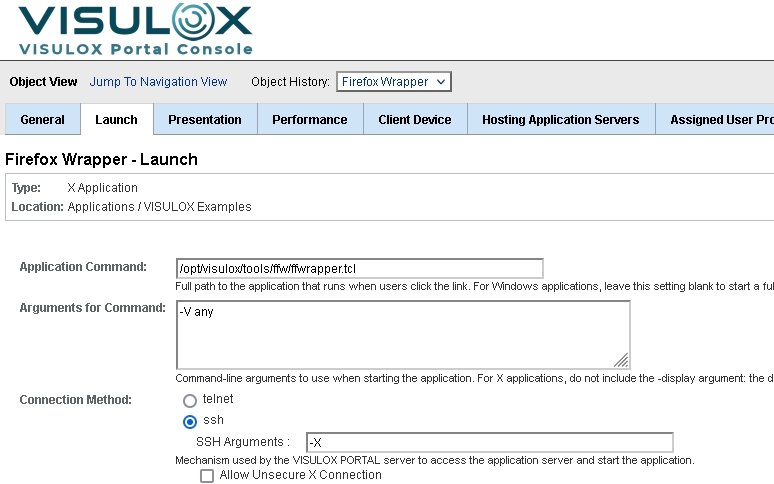
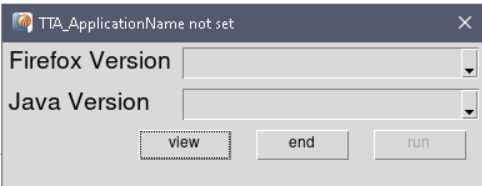
A selection window can be displayed on Firefox Wrapper start with the following Arguments for Command:
|
Configuration |
Selection on application start |
|
|
Useful arguments
|
Arguments |
Description |
|---|---|
|
-V <arg> |
Select Firefox Version. If 'any', user has to select the version.
|
|
-java <arg> |
Requested Java Version |
|
-drive <arg> |
Drive name in Citrix session for vlxtransit. Default: E
|
|
-path <arg> |
Path to Firefox Wrapper Files. Default: $FXBASE
|
|
-allowedSites <arg> |
List of allowedSides in Firefox profile |
|
-bwrap <arg> |
Bubblewrap-specific options <> |
|
-E <arg> |
Extension list for Firefox |
|
-debug |
No auto close |
Adding a new version
To add a new Firefox version, edit $VLXBASEPATH/tools/ffw/pathsAndVars.sh .
Adding a new Firefox version
FXLIST+="<version> $FXRELEASE/<url to version>;"
Example - Firefox 45
FXLIST+="45_64bit $FXRELEASE/45.0/linux-x86_64/en-US/firefox-45.0.tar.bz2;"
After adding new versions, redo the steps of the installation
If the Firefox versions can not be downloaded by the installation script, a manual download is needed from the Firefox version repository:
https://ftp.mozilla.org/pub/firefox/releases
Provide Flash
The script installFlash.sh puts the the flash plugin into place. The flash plugin is addressed by all Firefox versions.
Flashplugin
/opt/ffw/flash
Provide Java versions
The Firefox Wrapper can assign different Java versions as well.
The Java versions are extracted and installed as RPMS with installJavaPlugin.sh.
JAVA plugins
/opt/ffw/java
Previous Java versions can be downloaded from:
http://www.oracle.com/technetwork/java/archive-139210.html
Firefox Wrapper sandbox
Firefox Wrapper can be adjusted to restrict the access of the users.
The user is able to see only his own files.
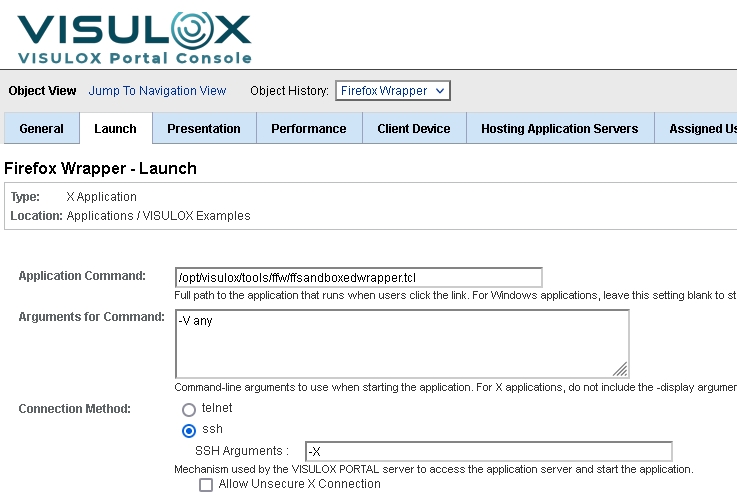
Use the following configuration for a Firefox Wrapper sandbox application:
Allowed sites for add-ons / plugins
For vlxshell and ffwrapper the Firefox allowedSite database can be preset during startup.
The parameter is -allowedSItes, the arguments are comma separated URLs, which will be trusted. Multiple URLs can be added.
This allows to specify websites, that are allowed to install add-ons and plugins without a warning.
Update
Ater updating VISULOX the script has to be run manually again
$VLXDIR/tools/ffw/setup/installFirefoxWrapper.sh
Check the file permissions! Files must be readable by vlx user.