
How to setup keepalived
About
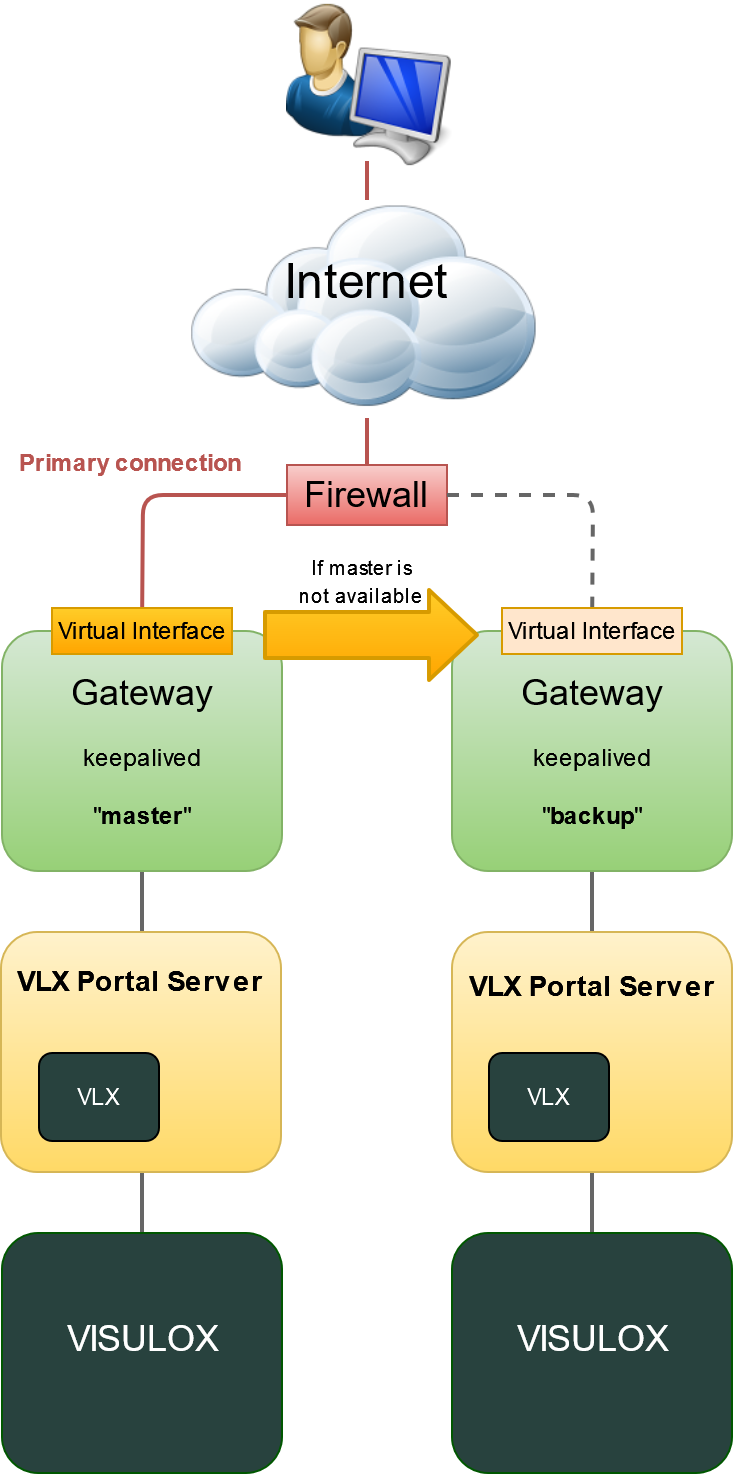
The common method to implement a single access URL for a VISULOX Portal environment and more than one A possibility to solve this issue is to set up the keepalived daemon to provide the single URL to all portal users. In this constellation the "master" Gateway provides the network interface with the virtual IP address and all sessions Then the Gateway process is not running on the "master" Gateway, the keepalived process disables the virtual interface. |
Installation
The keepalived RPM is available in the Linux distribution and can be installed via dnf or yum.
The rpm package has to be installed on all VISULOX Gateway Servers:
Install
dnf install keepalived
Copy /opt/visulox/setup/monitoring/checkPortal.sh to the /etc/keepalived/ directory.
Configuration
Configuration on the master GW:
Master: /etc/keepalived/keepalived.conf
! Configuration File for keepalived
global_defs {
   notification_email {
     sysadmin@firewall.loc
   }
   notification_email_from lb1@firewall.loc
   smtp_server localhost
   smtp_connect_timeout 30
 }

vrrp_script chk_gateway {
    script       "/etc/keepalived/checkPortal.sh -gw -e -q"
    interval 15  # check every 5 seconds
    fall 2       # require 2 failures for KO
    rise 2       # require 2 successes for OK
    timeout 4
}
vrrp_instance VI_EXTERNAL {
    state MASTER
    interface ens160
    virtual_router_id 51
    priority 255
    advert_int 1
    authentication {
        auth_type PASS
        auth_pass 1111
    }
    virtual_ipaddress {
        192.168.10.222/24
    }
    track_script {
        chk_gateway
    }
}
Configuration on the backup GW:
Backup: /etc/keepalived/keepalived.conf
! Configuration File for keepalived

global_defs {
   notification_email {
     sysadmin@firewall.loc
   }
   notification_email_from lb1@firewall.loc
   smtp_server localhost
   smtp_connect_timeout 30
 }
vrrp_script chk_gateway {
    script       "/etc/keepalived/checkPortal.sh -gw -e -q"
    interval 15  # check every 5 seconds
    fall 2       # require 2 failures for KO
    rise 2       # require 2 successes for OK
    timeout 4
}
vrrp_instance VI_EXTERNAL {
    state BACKUP
    interface ens160
    virtual_router_id 51
    priority 200
    advert_int 1
    authentication {
        auth_type PASS
        auth_pass 1111
    }
    virtual_ipaddress {
        192.168.10.222/24
    }
    track_script {
        chk_gateway
    }
}
Settings
SELINUX
chcon -t keepalived_unconfined_script_exec_t /etc/keepalived/checkPortal.shFIREWALL
firewall-cmd --add-rich-rule='rule protocol value="vrrp" accept' --permanent
firewall-cmd --reload
Start and enable
systemctl enable --now keepalivedCreating new Access Point
When VISULOX Access Points are configured, login with the keepalive - URL is not possible.
Configure a new Access Point with both GW IP addresses as source.
visulox config accesspoint add -name <keepalived_name> -banner "banner on login page" -connection "text on login page" -gatewayip <gw01_ip>:<gw02_ip>
Related articles
- Additional integration aspects
- Gateway Session Balancing
- How to create a feedback page for Load Balancers in the VISULOX GATEWAY configuration
- How to setup keepalived
- Monitoring tool: checkPortal.sh
- Additional integration aspects
- Gateway Session Balancing
- How to create a feedback page for Load Balancers in the VISULOX GATEWAY configuration
- How to setup keepalived
- Monitoring tool: checkPortal.sh
- Additional integration aspects
- How to create a feedback page for Load Balancers in the VISULOX GATEWAY configuration
- How to setup keepalived
- Monitoring tool: checkPortal.sh
- VISULOX Portal maintenance mode
- Additional integration aspects
- How to create a feedback page for Load Balancers in the VISULOX GATEWAY configuration
- How to setup keepalived
- Monitoring tool: checkPortal.sh
- VISULOX Portal maintenance mode
- Additional integration aspects
- How to create a feedback page for Load Balancers in the VISULOX GATEWAY configuration
- How to setup keepalived
- Monitoring tool: checkPortal.sh
- VISULOX Portal maintenance mode