
To connect to the service, the URL has to be provided by the supervisor. With this URL, connection to the VISULOX PORTAL via browser is possible.
Supported browsers are Firefox, Chrome, Edge and Safari.
|
Supported Client Platform |
Supported Browsers |
|---|---|
|
Microsoft Windows 10 (64-bit only)
|
Microsoft Edge 145 Mozilla Firefox 147
|
|
Oracle Linux 8
|
Mozilla Firefox 131
|
|
Ubuntu Linux 20.04
Ubuntu Linux 24.04
|
Mozilla Firefox 131
|
|
macOS 10.13
|
Safari 17.5
|
The table shows the client platforms and browser versions that have been tested with this release.
The latest versions of the browsers listed in this table are supported. Browsers not shown in this table may be supported at a later stage.
In a VISULOX environment direct login is configured by default, so the login mask of VISULOX PORTAL is displayed.
Access with Vispra Client
VISULOX PORTAL provides a modern login mechanism. Therefore a client side component has to be downloaded and registered in the browser.
Login screen:
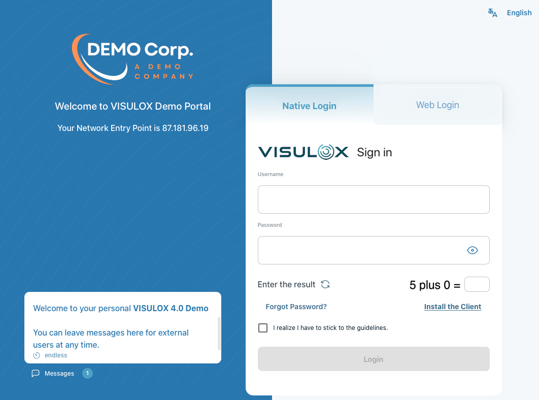
Choose "Install the client" link before the first login.
It is also possible to choose "Web Login" to use the HTML5 Client.
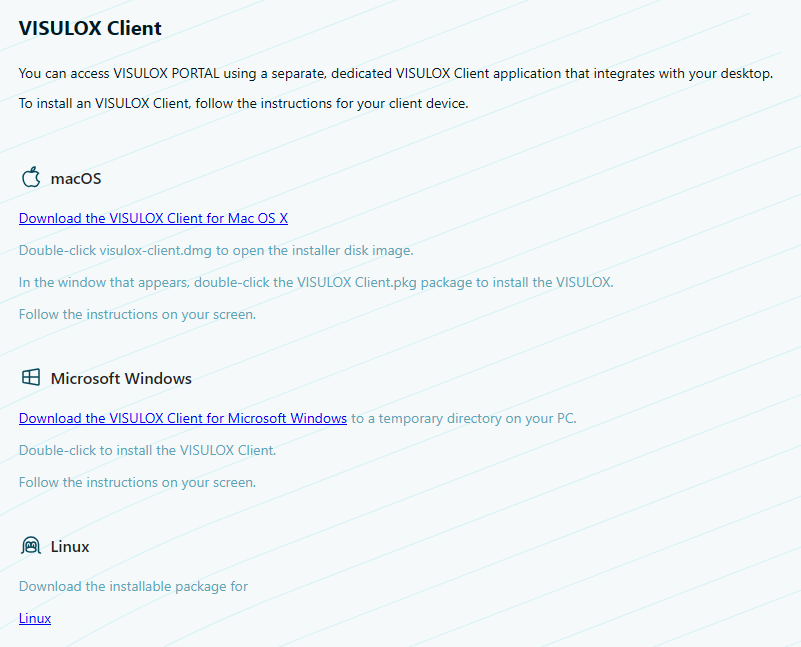
The client files must be extracted from vlx-vispra-clients-1.0.0.zip and copied to the /etc/nginx/html/vlx/client/ folder
on the portal server by an administrator to be available for download via the login page for users.
Supported Operating Systems & Installation
|
OS |
Installation Steps |
|
macOS |
|
|
Windows |
|
|
Linux (Partially) |
Compatibility Note: XPRA version 6.4.3 has been successfully tested on Ubuntu 24.04 LTS (Noble). |