
VISULOX Filters
OverviewWith VISULOX it is possible to define filters:
This article explains the different filters and their usage. |
The filter elements
Filter for user and group
This filter is a list of users and user groups selected from the datasources. It is possible to define wild card filters as long as the filter has a result.
Filter for application
This filter is a list of applications. The applications are all listed in the datasource object of VISULOX. Wild card filters are possible as long as the filter has a result.
Filter for the remote access IP address
This filter is a list of IPv4 addresses. The element delimiter is a comma. This filter can be an IP address or IP Mask. It is possible to enter netmask like 192.168.10.0/24.
Filter for the access point
It is possible to select one ore more available acces points. An access Point is either a VISULOX Access Node or a VISULOX GATEWAY.
Wildcard filter
Wild card filters can not be used if the filter GUI is called within a role. This prevents to build filter which are too open.
Wild card filters are based on glob (http://www.tcl.tk/man/tcl8.6/TclCmd/glob.htm)
VISULOX filter GUI
The VISULOX Filter GUI has two presentations. View and Edit.
| Presentations | |
|---|---|
| View | Show the lines |
| Edit | Strings can be entered, objects can be selected |
With the Compose button, filters like User / group can be selected (View). The Remote IP filter is entered directly (Edit)

Filter example

User / group is limited to 25 elements, Application to 40 per default. These values can be changed
Example to set to 10 for both, user/group and applications
./visulox config edit -name vlxgui.filter.maxuser=10,vlxgui.filter.maxapplication=10Example: Object
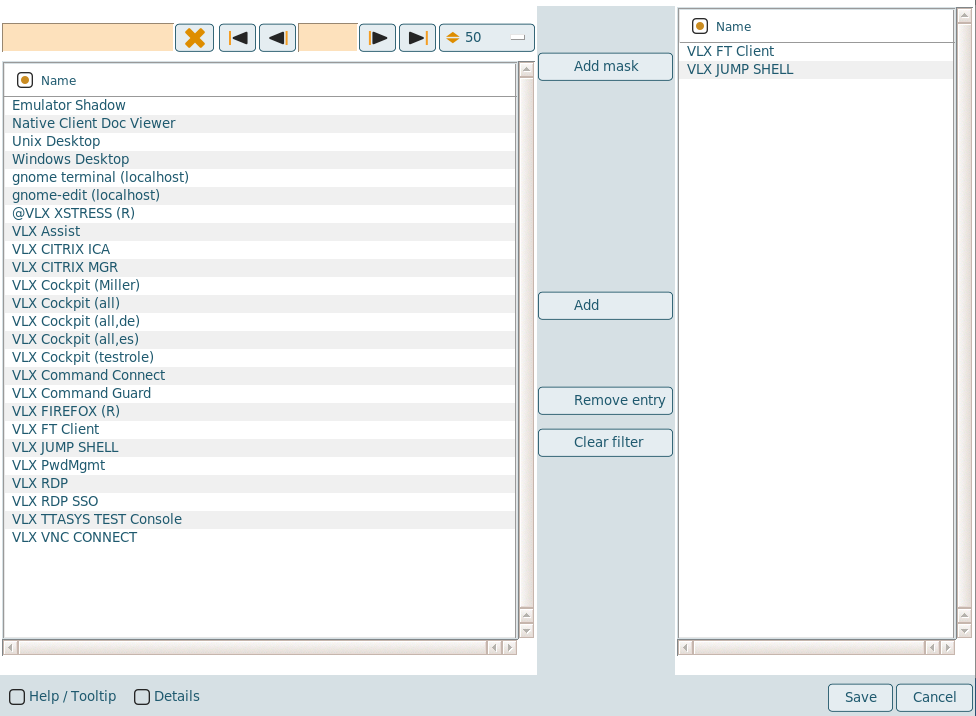

Depending on the usage in the VISULOX policies, the VISULOX Filter GUI can be displayed in different presentations.
It is recommended to set the vlxgui.usestrictfilter parameter to 1 to prevent the configuration of a filter mask in the GUI, which will have no result.
visulox config edit -name vlxgui.usestrictfilter=1