
Requirements
General
- The recommended platform is Oracle Linux / Red Hat 9 (for other versions contact amitego) with at least 10Gbyte for the OS,
20Gbyte for VISULOX PORTAL Service and 30 Gbyte for the VISULOX Service free space on the hard disc (small installation) - The /opt directory must NOT be mounted with -nosuid parameter
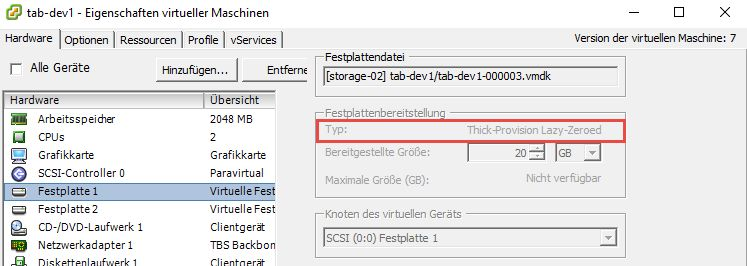
- VISULOX can be vitualized, the disk must NOT have "Thin provisioning" enabled
- umask 022 is needed for installation and start of the VISULOX PORTAL Service
- Symbolic links are not supported
- If autofs is used wiith transit mapping, Selinux has to be disabled
- The users ttasys and ttaserv are placed in the /home directory during installation.
- The recommended VISULOX version is the latest VISULOX 4 release
- The recommended user repositories are all repositories, that are supported by VISULOX PORTAL Service
- Firewall configured properly or disabled
- /etc/hosts should look like: 127.0.0.1 localhost localhost.localdomain
- NTP or Chrony enabled
- For ports, see: Network communication within VISULOX

Make sure that correct hostnames are used for the servers in the environment.
Hostnames must not contain underscores (because of RFC 952 and domain names with underscores)!
The FQDN of the host must not exceed 50 characters!
Capital letters must not be used in hostnames!
Changing hostnames after installation of VISULOX is not supported!
Checking the hostname (must be identical):
nslookup $(hostname -f) --> Hostname and IP address is displayed
nslookup <IP address> --> IP address and hostname is displayed

getent ahosts $(/opt/tarantella/bin/bin/ttahostname) --> IP address and hostname is displayed
getent hosts <IP address> --> IP address and hostname is displayed

getent ahost localhost --> IP address is displayed (127.0.0.1)
getent hosts 127.0.0.1 --> IP address (127.0.0.1) and hostname (localhost) is displayed
Required packages
Choose Server or Server with GUI for the base environment.

The basic server installation contains all necessary software for VISULOX. Additional software should not be installed on a VISULOX server.
Runlevel 3 multi-user target is recommended.
The recommended OS is Oracle Linux 9. As an alternative Red Hat Linux could be used, which will possibly need some other packages as listed here.
For other OS versions please contact amitego.
For Oracle Linux 9 the following adjustment is necessary after an array installation:
Delete SHA1 in /etc/crypto-policies/back-ends/java.config:
jdk.certpath.disabledAlgorithms=MD2, MD5, DSA, RSA keySize < 2048This setting should be checked again after yum update.
Disk layout
The platform disk layout can be as usual. We recommend at least 10 Gbyte for the OS,
Further we recommend to have a partition of 20Gbyte under /opt/tarantella, 30Gbyte under /opt/visulox (60Gbyte with Archive) in a small environment.
For a large environment we recommend to have at least 50Gbyte under /opt/visulox (100Gbyte with Archive).
An additional partition for File store is also recommended, which is mounted under /opt/visulox/data/filestore/0.
 VISULOX can be vitualized, the disk must NOT have "Thin provisioning" enabled. (See also: How to use VISULOX on virtualized VMWare disks, VISULOX disk space protection)
The /opt directory must NOT be mounted with -nosuid parameter.
Diskspace of VLX_DATADIR must have at least 2.5 of size of the database available because VACUUM creates a copy of the database.
For example: a 4GB database needs 6 GB free diskspace. The diskspace is checked with integriy check.
Libraries needed for VISULOX on Oracle Linux 8
Installing VISULOX 4 on Linux platforms, the yum / dnf command has to be used to ensure that any package dependencies are resolved automatically.
This means that yum must be configured to use a suitable Linux package repository. Make sure that oracle_appstream_latest and ol8-epel are in yum repolist as well.
dnf repolist
This system is receiving updates from Unbreakable Linux Network or Spacewalk.

repo id                                                                      repo name

ol8-codeready                                                                ol8-codeready
ol8-epel                                                                     ol8-epel
ol8_addons                                                                   ol8_addons
ol8_appstream_latest                                                         ol8_appstream_latest
ol8_x86_64                                                                   ol8_x86_64
ol8-codeready is needed for transitmapping.
For the Epel repository on Red Hat 8 use:
dnf install https://dl.fedoraproject.org/pub/epel/epel-release-latest-8.noarch.rpmdnf install java-11-openjdk
dnf updateyum update is recommended before installing the new packages!
Platform modification during installation
VISULOX PORTAL Service
Before installation of the VISULOX PORTAL Service, the following libraries should be installed: xterm xclock xauth
umask 022 is recommended for installation and start of the VISULOX PORTAL Service.
VISULOX PORTAL Service must be installed without symlinks.
During VISULOX PORTAL Service installation two users and a group will be created:
uid=500(ttasys) gid=500(ttaserv) groups=500(ttaserv)
uid=501(ttaserv) gid=500(ttaserv) groups=500(ttaserv)
VISULOX PORTAL and VISULOX service are also adding files for PAM authentication: /etc/pam.d/tarantella and /etc/pam.d/visulox.
VISULOX Service
The default VISULOX installation directory is /opt/visulox.
On group vlxgroup is generated on startup
On default 102 users are generated in for follwoing sequence: VISULOX user (vlx), VISULOX webservice user (vlxwebservice) and 100 Jump Users (vlx000 .. vlx099).
The users can be removed and recreated with an admin command by and a new start UID can be applied.
During VISULOX Service installation the following users and groups are created:
Primary VISULOX user and group
vlx:x:503:503:VISULOX user:/opt/visulox:/bin/bashThe vlxgroup must be a local group!
On every VISULOX Access Node, the VISULOX Service is attached to the VISULOX PORTAL Service and the webservice user is created with:
visulox portal attachVISULOX PORTAL connection user
vlxwebservice:x:610:500:VISULOX Admin User in VISULOX PORTAL:/opt/visulox/var/vlxwebservice:/sbin/nologinIf the webservice user should be created with a given name and UID on a VISULOX Access Node, the following parameters have to be adjusted:
visulox config -name portal.admin
    -----------------------------------------------
    | changed | key               | value         |
    -----------------------------------------------
    |         | portal.admin.uid  | 610           |
    |         | portal.admin.user | vlxwebservice |
    -----------------------------------------------
100 VISULOX jump users
vlx000:x:<next available user id>:503:Visulox transit user:/opt/visulox/users/vlx000:/bin/bash
...
vlx099:x:<next available user id>+100:503:Visulox transit user:/opt/visulox/users/vlx099:/bin/bash The group is the same of the vlx user. The VISULOX group
A VISULOX PID is generated on each VISULOX Node. This vlxpid is always vlxgroup+1.
During VISULOX Service installation, the set-user-id bit is set on the following binaries:
-r-sr-xr-x 1 root vlxgroup  18760 Sep 17 14:14 vlxchown
-r-sr-xr-x 1 root vlxgroup  38007 Sep 17 14:14 vlxsu
-r-sr-xr-x 1 root vlxgroup 16276 Sep 17 14:14 vlxsudoA file with the maximum number of processes and opened files for the vlx group is added: /etc/security/limits.d/90_visulox.conf
@vlx hard nproc 16000
@vlx soft nproc  4000
@vlx hard nofile 8000
@vlx soft nofile 2000
During setup, a log rotation entry for VISULOX is added: /etc/logrotate.d/visulox
Optional enhancements
VISULOX addons
The following VISULOX addons can be used, if the according packages are installed on the server:
VISULOX Firefox
Firefox
yum install firefoxVISULOX VNC
VNC Viewer
yum install tigervncTelnet
Telnet
yum install telnetChecksum in File Transfer
To display the checksum of transferred files in the VISULOX Transit Area in the user's Workspace it is necessary to install rhash, which is available in the Epel repository.