
Network communication within VISULOX
OverviewThere are several communication paths into, within, or out of a VISULOX environment. This article describes the communication paths within the platform. The article is based on the standard communication parameters within VISULOX. |

The VISULOX communication is dedicated to one interface.
A firewall between nodes in the cluster (VISULOX Service Nodes and VISULOX PORTAL Service Nodes) must be configured with the following setting "session time out=never".
Accessing client with VISULOX GATEWAY
VISULOX GATEWAY access, initiated from the client:
| Port | Comment |
|---|---|
| https/443 | User client communicates with HTTPS to the LoadBalancer or each VISULOX GATEWAY |
Accessing client without VISULOX GATEWAY
Direct access, initiated from the client:
| Port | Comment |
|---|---|
| https/443 | Client communicates with HTTPS to each VISULOX PORTAL Service |
| AIP/5307 | In VISULOX GATEWAY or in non firewall traversal mode, the client communicates to each VISULOX PORTAL Service |
VISULOX GATEWAY to VISULOX PORTAL Service
Communication between VISULOX GATEWAY and VISULOX PORTAL Service, initiated from the VISULOX GATEWAY:
| Port | Comment | |
|---|---|---|
| https/443 | TCP | HTTPS dialog |
| AIP/5307 | TCP | AIP dialog |

VISULOX PORTAL Service to VISULOX PORTAL Service
| Port | Comment | |
|---|---|---|
| PortalARRAY/5427 | TCP | Communication |
| x11-offset/6000+ | TCP | Assist, Dual Control, ttashadow |
VISULOX PORTAL Service to VISULOX Service
No firewall rule needed, only loop-back communication:
| Port | Comment | |
|---|---|---|
| 9001 | TCP | This will be only an internal (localhost) communication on VISULOX ACCESS Nodes, where VISULOX PORTAL Service and VISULOX Service is installed |
VISULOX Service on VISULOX ACCESS Node
| Port | Comment | |
|---|---|---|
| 443 | TCP | VISULOX reads the VISULOX PORTAL webservice via a localhost connection (only loop-back communication:) |
VISULOX Service on other servers to the VISULOX PORTAL Service
| Port | Comment | |
|---|---|---|
| x11-offset/6000+ | TCP | VISULOX Cockpit, Jump Shell, Command Connect, Command Guard or FT Client always use a VLX transituser. If one of these programs is used on another server, it is necessary that this server is able to communicate via X11 native (port 6000+). For example a VISULOX Archive Server will need this port open. See also: VISULOX SSH X11 Forwarding to VISULOX Application Nodes |
| Connection with port 6000+ | Connection with VLX x11 forwarding |
|---|---|
|
|
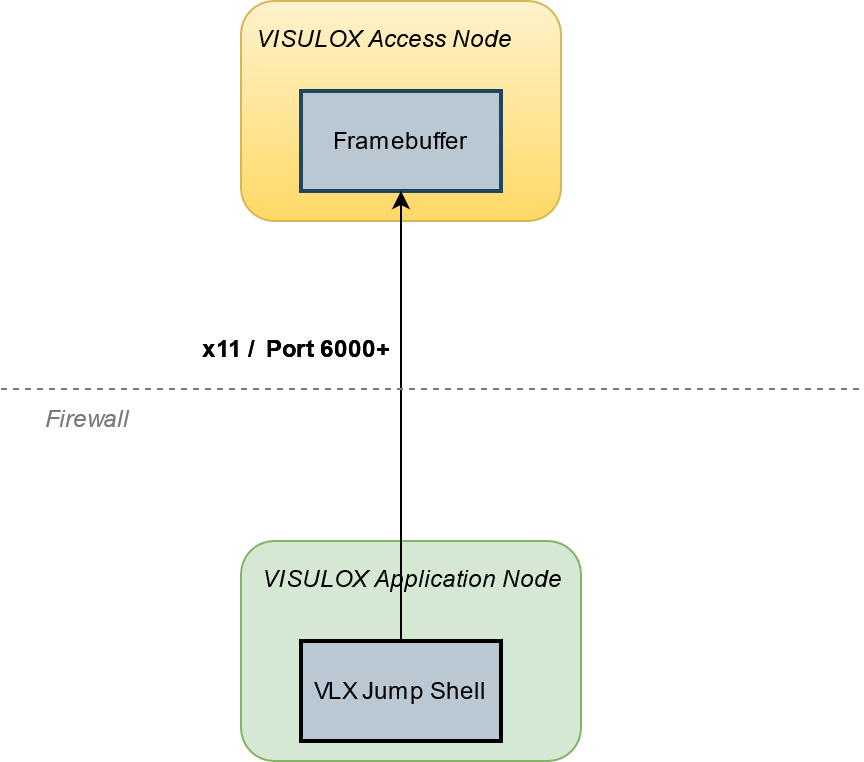
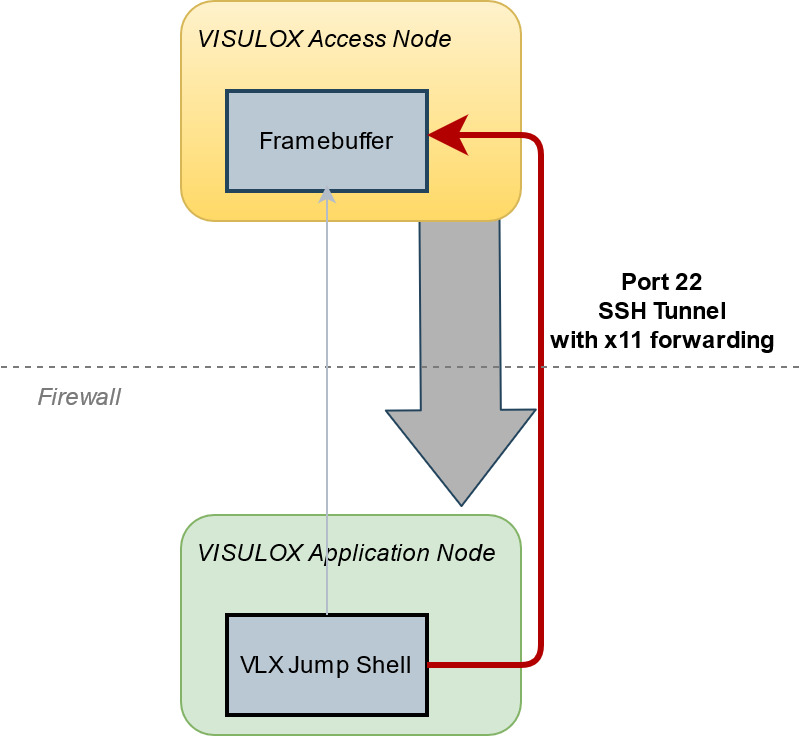
VISULOX Service to VISULOX Service
Communication between any VISULOX Node (including Archive Node) in a VISULOX Cluster, initiated from a VISULOX Node:
| Port | Comment | |
|---|---|---|
| 7001 | TCP | Send requests to the VISULOX router |
| 7002 | TCP | Status updates from other VISULOX routers |
| 7003 | TCP | File Transfer service between nodes |
| 7004 | TCP | Reserved for future communication |
| 7005 | TCP | ETCD cluster communication |
| 7006 | TCP | ETCD client to cluster communication |
| 7007-7010 | TCP | Reserved for future communication |
These ports are also checked within VISULOX Integrity-Check.
Accessing the VISULOX Transit Page
Connection from a browser running on an internal application server, initiated from the application server:
| Port | Comment | |
|---|---|---|
| https/1443 | TCP | User can connect to the File Transfer Transit page. This service can be configured to be available only on a specific VISULOX Node |

Depending on the environment and the specific software (e.g. nagios, yum, anti-virus updates, etc) installed on the server it may become necessary to allow further ports for communication.
This weakens the security concept and has to be done very carefully for each single server.
Example configuration for firewalld (Linux 7.x)
VISULOX PORTAL Service
Create new file: /usr/lib/firewalld/services/tta.xml
/usr/lib/firewalld/services/tta.xml
<?xml version="1.0" encoding="utf-8"?>
<service>
  <short>Portal Firewall Rules</short>
  <description>The following rules are needed for the VISULOX PORTAL Service.</description>
  <port protocol="tcp" port="80"/>
  <port protocol="tcp" port="443"/>
  <port protocol="tcp" port="5307"/>
  <port protocol="tcp" port="5427"/>
</service>
VISULOX Service
Create new file: /usr/lib/firewalld/services/vlx.xml
/usr/lib/firewalld/services/vlx.xml
<?xml version="1.0" encoding="utf-8"?>
<service>
  <short>VISULOX Firewall Rules</short>
  <description>The following rules are needed for the VISULOX Service and the VISULOX Components.</description>
  <!-- Recorder Access on VISULOX PORTAL Nodes  -->
  <port protocol="tcp" port="6000-6500"/>
  <!-- VISULOX Communication -->
  <port protocol="tcp" port="7001-7010"/>
  <!-- Webservice, FTPD and Fileexchange  -->
  <port protocol="tcp" port="21"/>
  <port protocol="tcp" port="1443"/>
  <port protocol="tcp" port="8114"/>
  <port protocol="tcp" port="8115"/>
</service>
Use the following commands to permanently enable the VISULOX firewall rules:
firewall-cmd --permanent --zone=public --add-service=vlx
firewall-cmd --permanent --zone=public --add-service=tta

firewall-cmd --reload
success