
VISULOX Node hierarchy
In some environments it makes sense to setup VISULOX Nodes in different locations and zones.
Therefore the location has to be set, once a node is created and the zone is specified, when the node is attached to the VISULOX Cluster.
The location is set with the following command:
Example: Setting location A
visulox config -name layout.<nodename>.location=A When the node is attached to the VISULOX Cluster, the location and the zone must be specified:
Example: Attaching a node location A, zone B
visulox attach -location A -zone B Example setup
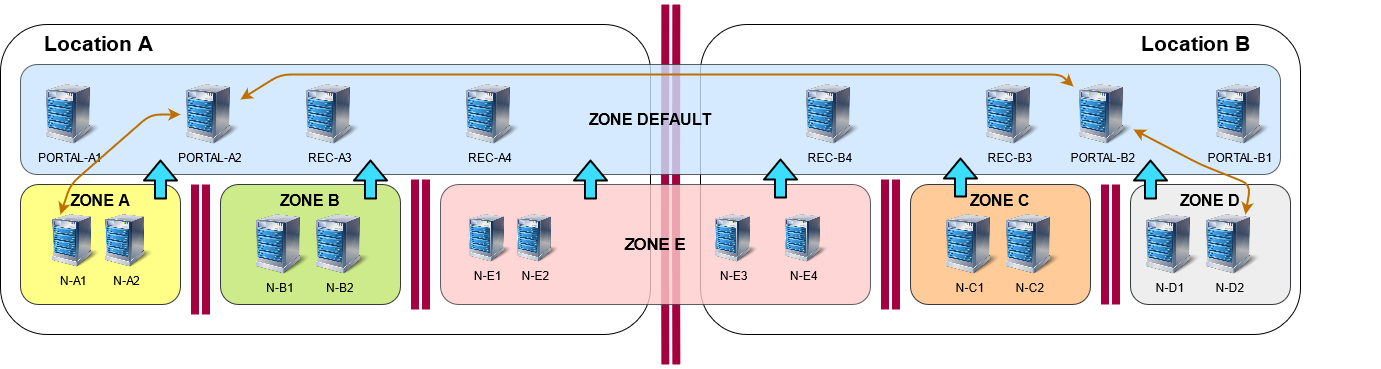

Nodes within the same zone are communicating with each other and need all related ports open.
Nodes within the same location need all VISULOX related ports open subject to the layout of the node.
Therefore the firewall rules must be set accordingly (see: Network communication within VISULOX).
In an environment with different locations and zones, the nodes in different Zones communicate only via the default zone and not directly with each other.
The Zones can be setup in various network segments with firewalls between them.