
How to use the VISULOX Command Line Interface from a remote server
BackgroundConceptional the VISULOX Command Line Interface is created on a remote server and sent via SSH to an available VISULOX Node. Therefore a trusted SSH communication between the remote server and the VISULOX Node has to be established. This trusted communication enforces the configured VISULOX command only (no other usage possible, like shell access). |
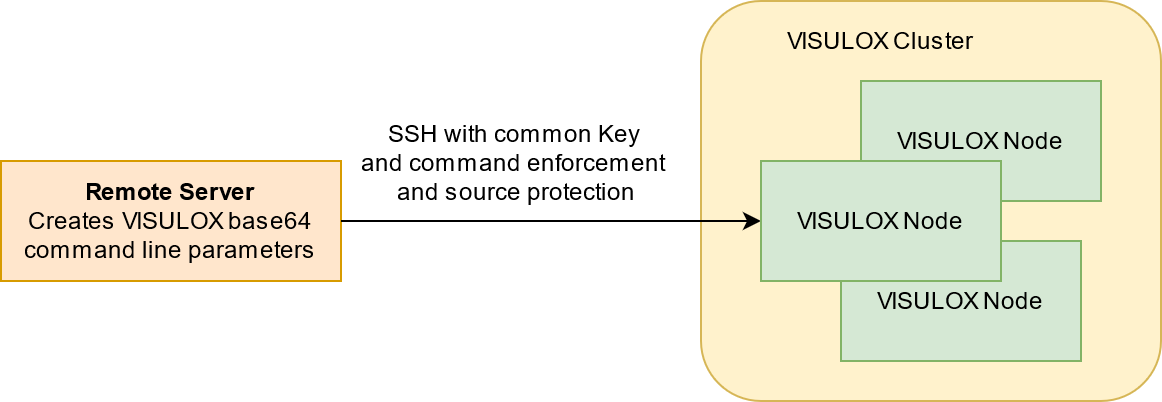
SSH has the possibility to add a command enforcement.
Create keypair anywhere
ssh-keygen -t dsa -C <keyname> -f <keyfilename> -N ""Modify key with command by editing the public part of the key: <keyfilename.pub>
If the options phrase at the beginning of a line contains the keyword command="string", then any SSH connection, that authenticates using this particular key will only run the command specified, even if the command line has specified another command.
command="visulox access add -stdin" ssh-dss AAAAB3NzaC1kc3 .... 19g4D3UCHNi1RIO08DeOq98yuW <keyname>An additional argument could be "from=", to restrict the servers.
If the options phrase at the beginning of a line contains the keyword from="string", this restricts the use of the key on that line to sessions that originate from hosts that match "string".
Examples might be:
- from="trusted.eng.cam.ac.uk"
- from="*.eng.cam.ac.uk,!untrusted.eng.cam.ac.uk"
- from="tw?00.eng.cam.ac.uk"
The hostname used has to be the hostname reported, when the IP (network) address of the connecting machine is looked up in the DNS. The “*” wildcard matches one or more characters, while “?” matches a single character. If the connecting host name matches an entry prefixed by “!”, then it will be rejected.
command="visulox policy access add -stdin" from="<name>" ssh-dss AAAAB3NzaC1kc3 .... 19g4D3UCHNi1RIO08DeOq98yuW <keyname>Import public Key to VISULOX
Add the pubic key to the VISULOX Nodes, which are called remotely:
mkdir /opt/visulox/.ssh
cat <keyname.pub> >>  /opt/visulox/.ssh/authorized_host
chmod 0400 /opt/visulox/.ssh/authorized_host
chmod 0500 /opt/visulox/.ssh
chown -R vlx:vlxgroup /opt/visulox/.ssh
Because the vlx user normally does not have a password, the command ssh-copy-id can not be used.
Execute command from remote
The private key <keyname> is transferred to the remote server.
There are two possibilities to provide parameters: clear text and base64. Base64 is recommended, because the command does not need any quoting or code page.
example
echo "-name AUTO -object64 Q049VGlsbG1hbm4gQmFzaWVuLE9VPU1pdGFyYmVpdGVyLE9VPVRvb2xCb3gsREM9dGJzb2wsREM9ZGU= \
-ticket64 MTIzNA== \
-endtime64 MjAxNi0wMS0wMQ==" | ssh -i <keyname> vlx@<nodename>