
VISULOX 5 | Operations Reference
Scope
This document covers service status, integrity, functional checks and high availability (HA) checks. Application creation and configuration are described in the Application Configuration Quick Guide. Policy configuration is outside the scope of this document. Command status: VISULOX, Portal and database connection commands are confirmed by an administrator. They have not been executed as part of preparing this document. HAProxy commands below assume a systemd unit named haproxy; confirm that unit name before use. The SQL statements are additional read-only checks. |
|---|
VISULOX Status and Integrity
visulox status
visulox integrity
Review service state and integrity results. Investigate reported failures before declaring the system operational.
VISULOX PORTAL Checks
systemctl status vlx-portal
/opt/visulox-portal/bin/vlx-portald health-check
Review both outputs for failures. A running service alone does not confirm that the Portal is fully functional. Complete the functional checks in Section 5.
High Availability Checks
HA Architecture Overview
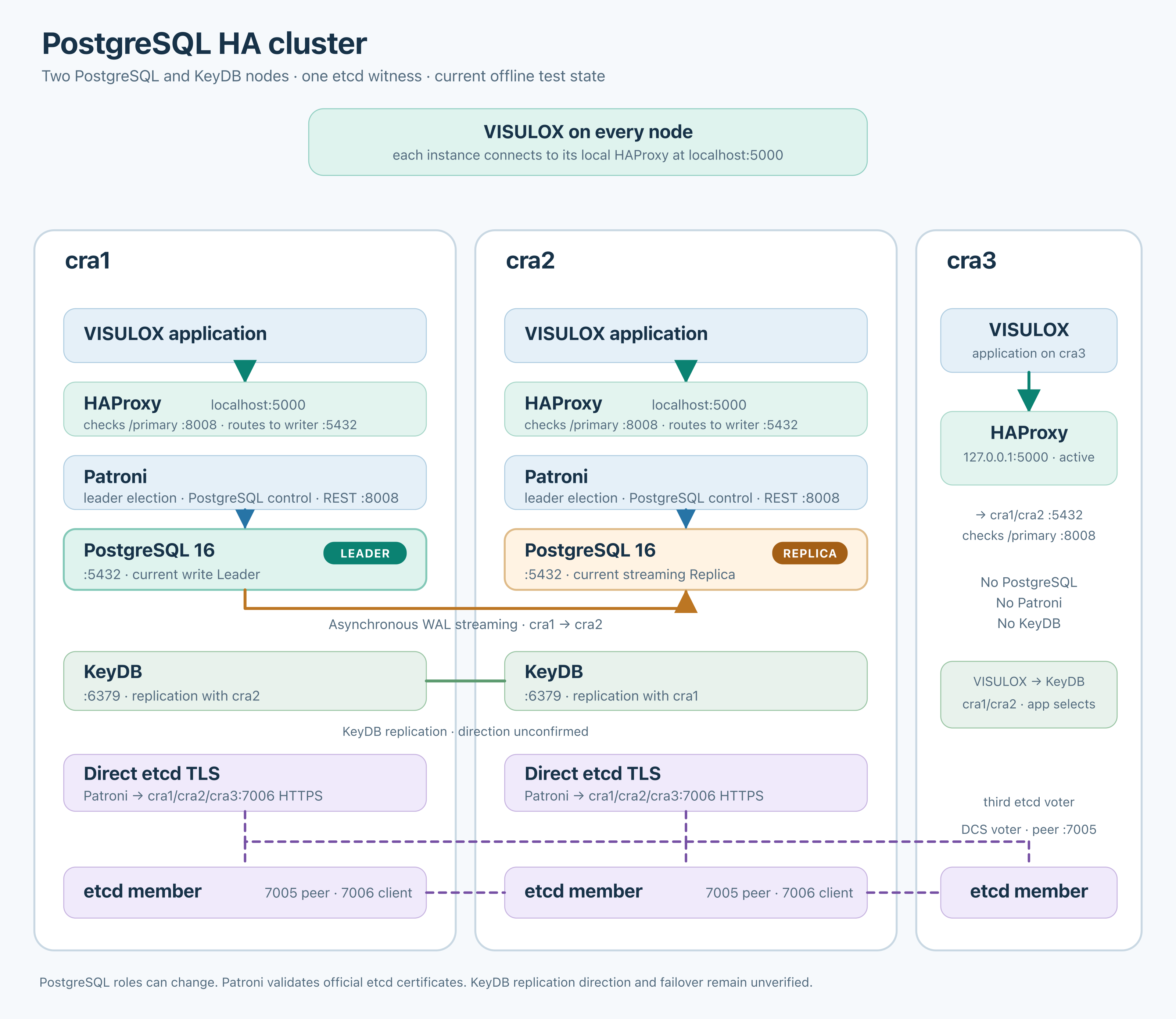
Figure 1: Example HA architecture, showing the supplied offline test state.
Each VISULOX instance connects to local HAProxy at localhost:5000. HAProxy checks Patroni /primary on port 8008 and routes database connections to the current PostgreSQL primary on port 5432.
The diagram is a test-state snapshot. PostgreSQL roles can change. KeyDB replication direction and failover behaviour remain unverified.
High Availability Checks (continued)
PostgreSQL and Patroni checks apply to cra1 and cra2. HAProxy and local database connectivity checks apply to cra1, cra2 and cra3. All three nodes host an etcd member; cra3 provides the third vote and has no local PostgreSQL, Patroni or KeyDB instance, according to the supplied diagram.
Patroni
On cra1 or cra2, switch to the PostgreSQL operating-system account:
su - postgres
patroni list
-
Confirm all expected database members are present.
-
Confirm one leader and the intended replica roles.
-
Check member health and replication lag against the acceptance limits.
Database Connectivity
On each applicable node, first switch to postgres using su - postgres. If already in that account, continue directly with the connection command:
psql -h localhost -p 5000 -U visulox -d visuloxdb
Within psql, run these read-only checks:
SELECT current_database(), current_user;
SELECT pg_is_in_recovery();
Confirm database visuloxdb and user visulox. For pg_is_in_recovery(), false indicates a primary and true indicates a standby in recovery. The diagram shows a writer endpoint, so false is expected there; compare with the current Patroni leader. Connectivity alone does not confirm replication health.
Leave psql, then return to the previous operating-system account:
\q
exit
High Availability Checks (continued)
HAProxy
Run from the administrative operating-system account on every node where HAProxy is deployed. Confirm the systemd unit name haproxy for this example.
Display service status and active state:
systemctl status haproxy
systemctl is-active haproxy
Review recent service logs:
journalctl -u haproxy --since "30 minutes ago" --no-pager
Check for a listening TCP endpoint on port 5000:
ss -ltnp 'sport = :5000'
Process details may require administrative privileges. A listening port alone does not establish that HAProxy has a healthy database backend.
-
Confirm HAProxy is active.
-
Investigate unresolved backend or connection failures in the logs.
-
Confirm the local database endpoint accepts the connection in Section 4.2.
-
Confirm the connected database role agrees with the current Patroni leader and the intended endpoint role.
If an HAProxy statistics interface or runtime socket is configured, inspect backend health there. Its address, socket path and access method require confirmation before a deployment-specific command can be added.
Overall HA Result
Declare HA healthy only when Patroni membership, replication state, HAProxy backend availability and database connectivity agree with the intended deployment.
These checks do not trigger failover. Session continuity during failover requires a separate approved test. The commands above do not validate etcd quorum or KeyDB replication directly; dedicated checks remain to be confirmed.
Functional Application Checks
Log in through the user-facing Portal with an assigned test user. Use existing configured applications. For application creation or configuration, refer to Creating a New Application in the Application Configuration Quick Guide.
SSH
Launch a representative SSH application and confirm access to the intended target. Verify clean session termination.
RDP
Open the configured Windows desktop or published RemoteApp on the assigned Windows application server. RDP applications run an RDP client locally on a Portal Server and must reference a Windows application server.
An empty Command field opens a desktop. A dedicated application or alias must be published as a RemoteApp. Without SSO, a credentials dialog appears; with SSO, VISULOX attempts authentication using the user's VISULOX credentials. Verify the expected authentication behaviour and clean termination.
Direct
Confirm local execution on an available Portal Server through Default Application Server Group. Direct applications must always use this group, which contains all Portal Servers. Selection considers availability and the number of running sessions.
Direct applications use transit users vlx000-vlx099, usually through vlxshell. Their environments reset after each session. Browser settings are not retained, and SSH host-key confirmations may be required again. Confirm successful launch and clean termination.