
VISULOX License
Overview
To use VISULOX a license is needed. The license can be tailored to the customer.
License control / impact
| License | Control / impact |
|---|---|
| Base / Cluster | VISULOX Base Licence (one VISULOX Node) or VISULOX Cluster License (unlimited VISULOX Nodes). |
| Users | The number of users are controlled on startup of any VISULOX application (VISULOX Cockpit,, File Transfer, Cooperation). If more users are online than licensed, the VISULOX application can not be used any more. A warning message will be displayed. |
| Multi Factor Authentication | Multi Factor Authentication for users. |
| Session recorders | If the number of licensed recorders is reached during session control, the session will be locked and can not be used anymore (Manual recording is always possible). |
| OCR Keyword Detection | OCR component to detect configured keywords in applications. |
| Host Control | If the number of licensed Command Connects / Guards is reached, the session will be locked and can not be used anymore. |
| Revision Server | Optional license for a Revision Server (Archive Server). |
| Support & Maintenance | If the support and maintenance time is is reached, the environment should only be updated, when a new valid license is available within the next 21 days. In an environment with a license where support and maintenance (S&M) has expired, VISULOX can still be used as usual. Once an environment without S&M is updated to a newer VISULOX version a timer is set and displayed in the VISULOX Cockpit. After 21 days of running the new version, a valid license for the new version has to be installed. Without a valid license installed after 21 days access is no longer possible and the VISULOX Cockpit can not be used anymore. There is also the possibility that a license is set to time limited. With such a license VISULOX can no longer be used when support and maintenance (S&M) has expired. |

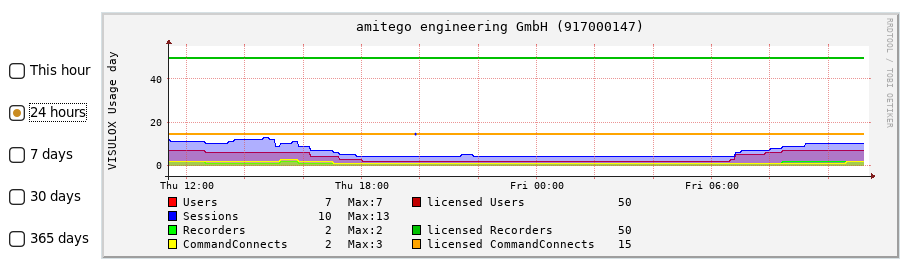
A graph of the license usage is displayed in VISULOX Cockpit / Cluster:
A Demo / Evaluation license is available and valid for 10 days including a VISULOX Base Node operating in total with 5 users, 5 session recorders and 2 Host Control applications.
A perpetual VISULOX License file is provided in a TAR archive from amitego. The license command understands this TAR file. There is no need to extract the tar files.

A perpetual VISULOX License file is provided by amitego Sales & Service. Contact: sales@amitego.com.
Installation / configuration of the license file
Show the current license
visulox license listCheck a provided license file
visulox license test -file <path to license file>Replace the current installed license
visulox license replace -file <path to license file>If a license is replaced on a node, it is replicated to all other nodes in the cluster.
If a new node is installed and attached to the VISULOX Cluster, it will get the license of the cluster. The Demo / Evaluation license is discarded.
- visulox license replace -file - [RETURN]
- Copy & paste:
Base64 license hash in eMail:
- VISULOX License start
asdfsdfasdfasdfasdfasdfasdfasdfasdfsadfasdfasdfasdfsadfasdfasdfasdfasdfasdff
asdasadasadasadasadasadasafdasfdasdafasdfdadfdaddafaddafadadfdadadfafdadfafa
sdgfhjsgdfjkashfjkghkaufghukahghukahghafdghaidghilafdhfgijgigfdahfghfduighuh
MX0gbXRhbiB7MX0gaGFzQ0cgezF9IG1vZHVsZXMge1ZMWDNBQywgMkZBLCBDR30gbGljZW5zYnVp
bGQgezE1MDM1NjA1NjJ9IEhBU0ggezE0NzNFQjJENTk2MjFGMDEyMTRFNkQ3MzhFM0EyQzA2fSBj
b21tYW5kY29ubmVjdHMgey0xfSBzbSB7MTUwMzQzOTasdarasdfadasdasdasd
-- VISULOX License end- [RETURN]
Get the usage of the installation
visulox license usageAvailable parameters: -component <users|sessions|recorders|hostcontrols> -unit <week|month|year>
With these parameters the maximum usage of a component can be displayed in the unit.

After installing a new license a restart of the VISULOX Service is necessary!