
How to use an LDAP/AD or Unix account to access the webservice
PurposeFor platform security reasons in projects, it makes sense to disable the login of native Unix users into the VISULOX PORTAL. If this is done the VISULOX user can no longer login. Therefore an LDAP account can be used as VISULOX Webservice User. |
Abstract
One of the VISULOX login authorities is the PAM stack. This allows any user listed in the Unix user repository to login into his account.
For security reason VISULOX PORTAL is limited to allow access only to those users, which have a VISULOX PORTAL profile in the datastore, i.e.. the default Unix user assigned to the user profile "o=Tarantella System Objects/cn=Administrator" is the unix user "root" (this can be changed).
With the VISULOX datasource distinguished LDAP name in searchadmin any LDAP user can be lifted to be a VISULOX PORTAL administrator.
In the latest VISULOX version (VLX 4.1.1) PAM is used for local users as well. /etc/pam.d/visulox can be adjusted. Profiles for local users have to be created or alternatively the Unix profile has to be activated again.
Each VISULOX PORTAL node needs a VISULOX webservice to retrieve information about other users, their sessions, the configuration and objects in the datastore.
This VISULOX webservice user is created as Unix user (hidden unexpireable password) during VISULOX portal attach or can be assigned to the command.
If PAM authority has to be disabled fully, a special LDAP user can take the role of the VISULOX webservice.
The webservice user is always the node name. This name must exists in the user repository.
cn=<node>,OU=org2,OU=org1,DC=domain,DC=topIt is important, that this LDAP user has a password, that never expires.
Creating the LDAP user
Create a user for each VISULOX Access Node in one of the LDAP/AD servers. The name of the user must be the short name of the VISULOX Access Node. Every user must have a valid password with unlimited lifetime.
Attach with LDAP user
visulox portal attach -adminou <oupathtouser> -adminpwd <pwd>Example
visulox portal attach -adminou "ou=Group1,ou=Org a,dc=domain,dc=com" -adminpwd <pwd>The command creates the necessary LDAP mirroring in the VISUOX PORTAL datastore.
Disable Unix login
This will disable the local webservice user login.

./tarantella config edit --login-ens 0
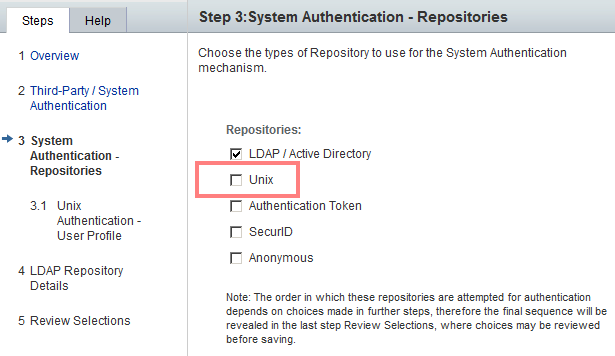
Or disable Unix user login via command line
visulox-portal config edit --login-ens 0Related information
- VISULOX-GATEWAY Command
- How to exclude single datastore users from import
- VISULOX PORTAL Console
- How to configure a user account as a group account
- How to work with VISULOX Datasources
- VISULOX PORTAL Server Array
- VISULOX-PORTAL OBJECT Command
- How to use an LDAP/AD or Unix account to access the webservice
- VISULOX-PORTAL Command
- Attaching VISULOX Service to VISULOX PORTAL Service
- How to import users as VISULOX PORTAL administrators
- How to import users as VISULOX PORTAL administrators
- How to exclude single datastore users from import
- How to configure a user account as a group account
- How to work with VISULOX Datasources