
How to create and use notifications
General
Notifications are used to inform supervisors and users about a variety of actions via eMail or SMS, e.g. login, application start/stop, recording start/stop, access ending, keystroke detected, etc.
It is possible to create individual notification scripts, that can be enriched with a plenty of variables.
Prerequisites
For this example setup two users have to be registered in VISULOX PORTAL with the following settings:
| User | Role | SMS | Application | Other | |
|---|---|---|---|---|---|
| Master | Supervisor | <supervisor>@company.com | - | VISULOX Cockpit | - |
| Miller | User | <user>@company.com | - | VLX Jump Shell | - |
Supervisor Master creates notification scripts and configures the notifications in Cockpit / Administration / Actions.
User Miller logs into VISULOX PORTAL and starts an application.
Creating a notification script
Example 1: Notification script on application start
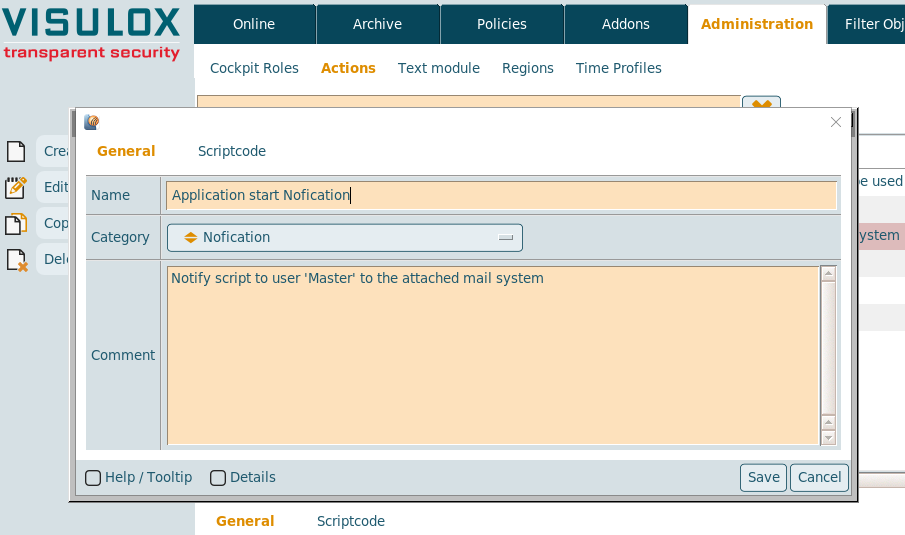
A unique name for the notification script must be entered: "Start notification"
The script category has to be selected: "Notification"
A comment can be filled out.
The scriptcode of the script enriched with the VISULOX variables has to be created.
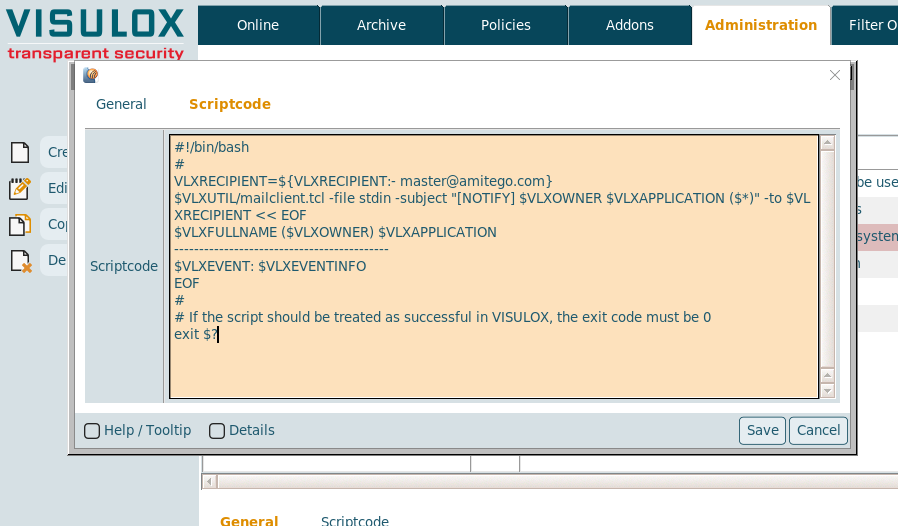
As recipient, the eMail address of supervisor Master must be used in this example.
Example 2: PIN notification script to 2FA users
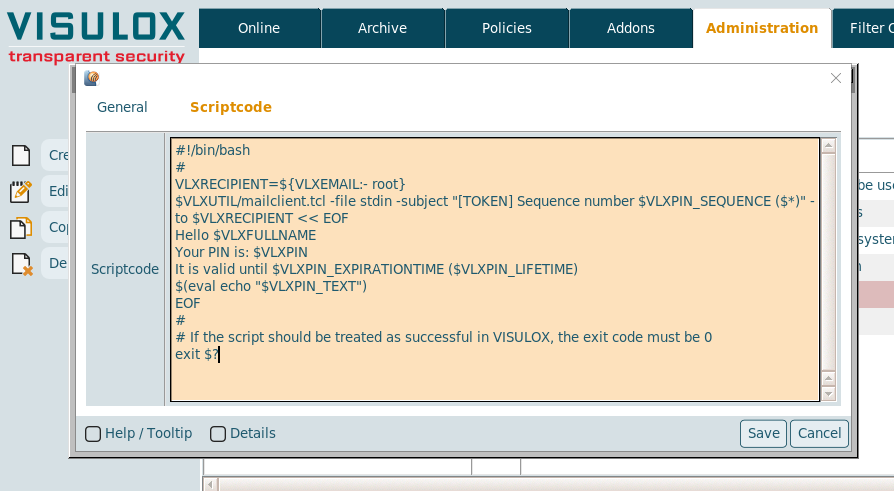
A unique name for the notification script must to be entered: "PINscript"
The script category has to be selected: "PIN"
A comment can be filled out.
And the content of the script enriched with the VISULOX variables has to be created.
The variable "$VLXEMAIL" will use the eMail address of user Miller as it is registered in the VISULOX PORTAL Datastore.
Available script categories
Category | Used as |
|---|---|
Notification | These action scripts can be chosen, where application notifications are used (Application Policy). |
Pin | These action scripts deliver information for the Multi Factor Authentication (Login Policy). |
Report | These are report actions scripts. |
Validate | These action scripts can be chosen for validation. |
* | These action scripts are available everywhere scripts can be used. The setup provides one script in this category, |
Notification script variables (examples)

The following list contains some useful examples for script variables.
To get the complete list of available variables for a certain action script, the dump script should be used.
Variable | Description |
|---|---|
VLXFULLNAME | Full name of the user |
VLXSURNAME | Surname of the user |
VLXEMAIL | eMail address of the user |
VLXSMS | SMS address of the user |
VLXOWNER | Owner of the application |
VLXGROUPLIST | Group list |
VLXUSERPROFILE | Profile of the user |
VLXPIN | PIN for Multi Factor Authentication |
VLXPIN_FMT | Formatted PIN for Multi Factor Authentication |
VLXPIN_SEQUENCE | Sequence number for PIN |
VLXPIN_EXPIRATIONTIME | Expiration time with date for the PIN |
VLXPIN_LIFETIME | Lifetime for the PIN |
VLXPIN_TEXT | PIN text |
VLXACCESSPOIN | Access Point |
VLXCREATETIME | Creation time |
VLXLOG | Path to logs |
VLXLOGINUSER | Logged in user |
VLXMANAGER | Manager of the user |
VLXOBJECT | Name of the object |
VLXOWNERID | Owner ID |
VLXOWNERSHORT | Short name of the owner |
VLXPOLICY | VISULOX policy |
VLXREMOTEIP | Remote IP |
VLXSMS | SMS of the user |
VLXLISTHASH | Hash |
VLXCLIENTIP | Client IP address |
VLXLANG | Language |
VLXSESSIONHOST | Host, where the session was started |
VLXCREATETIME_FMT | Time of creation (readable) |
VLXSESSIONSTARTTIME | Start time of the sesssion |
VLXSESSIONDURATION | Duration of the session |
VLXSESSIONDURATION_FMT | Duration of the session (readable) |
VLXSESSIONENDTIME | Endtime of the session |
VLXSESSIONENDTIME_FMT | Endtime of the session (readable) |
VLXAPPLICATION | Application name |
VLXRECIPENT | Recipient |
VLXTICKETID | Ticket ID of the user |
VLXLOGINSCRIPT | Login script |
VLXAPPLICATIONUSER | User of the application |
VLXBADWORD | Detected keyword in Keyboard recording |
VLXEVENTINFO | Event info |
VLXCREATEDBY | Created by |
VLXCREATEDBYSHORT | Short name of creator |
See also:
Configuring notifications
Example 1: Notification on application start from user Miller
Creating a new Application Policy in Cockpit:
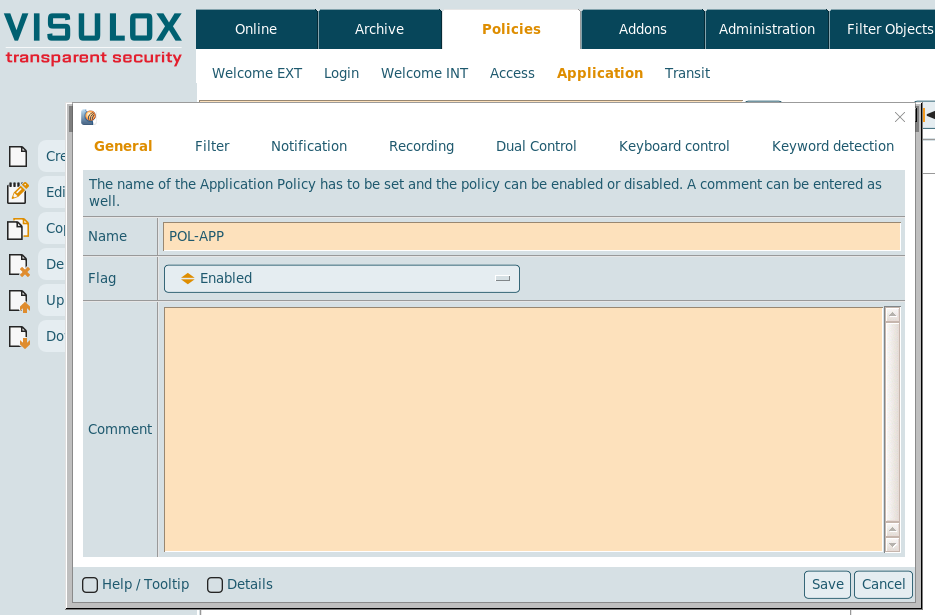
A unique name for the access Policy has to be entered: "POL-APP".
Policy mode is: "Enabled" .
A comment can be filled out as well.
Setting the filter:
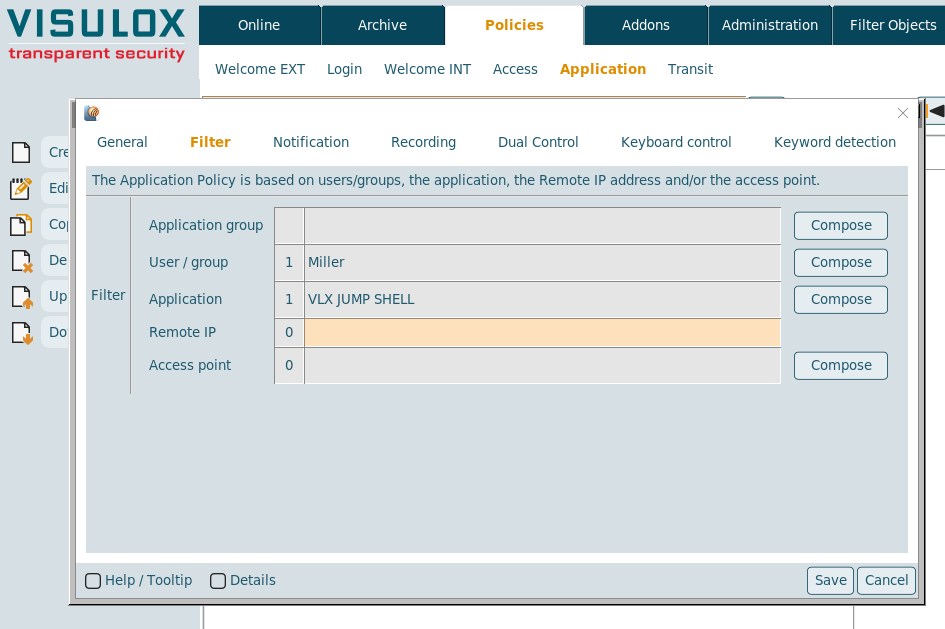
The notification will only be send for the "VLX Jump Shell" application from user "Miller" in this example.
It is also possible to set a filter for the Remote IP address or the Access point (not used in this example).
Selecting the notification script:
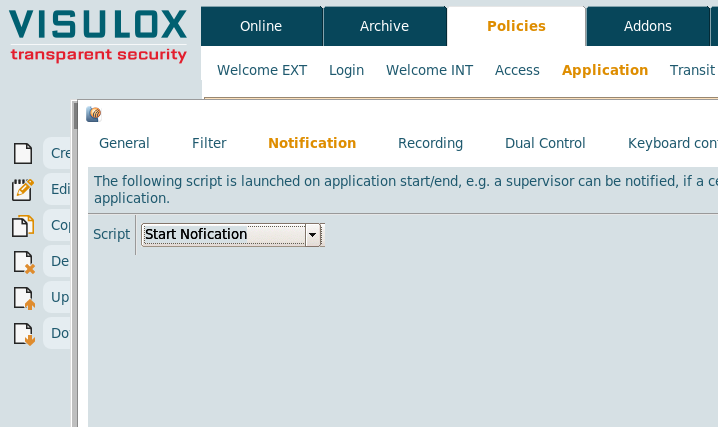
As notification script, the script created in the first step should be selected: "Start Notification".
Now user Miller starts the "VLX Jump Shell" application from his Workspace and the notification eMail is sent to supervisor Master:
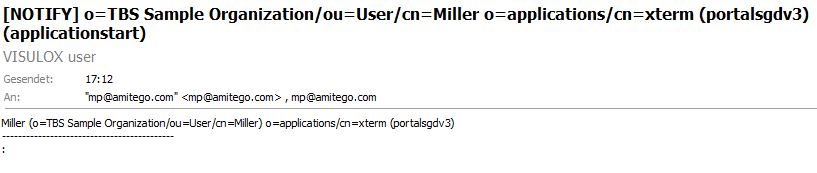
The eMail with the notification is sent to supervisor Master as registered in the script.
The displayed information is based on the created script in the first step.
Example 2: PIN notification for user Miller
Creating a new Login Policy in Cockpit:
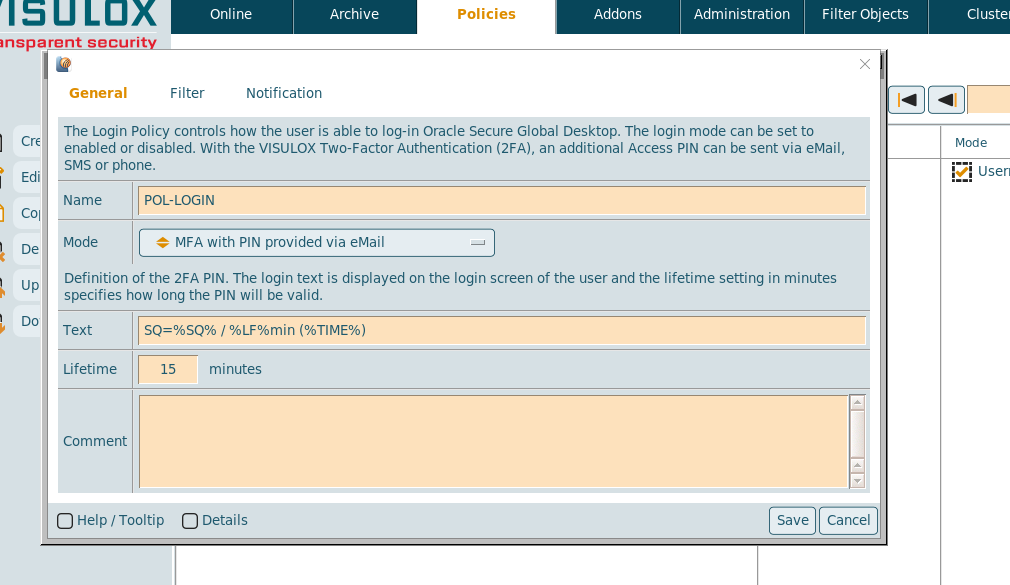
A unique name for the policy must be entered: "POL-LOGIN".
The Policy mode can be chosen from a dropdown list: "MFA with PIN provided via eMail".
The sequence number, the lifetime and the time will be displayed on the login mask of the user.
The default settings are fine for this example. A comment for the policy can be entered as well.
Setting the filter:
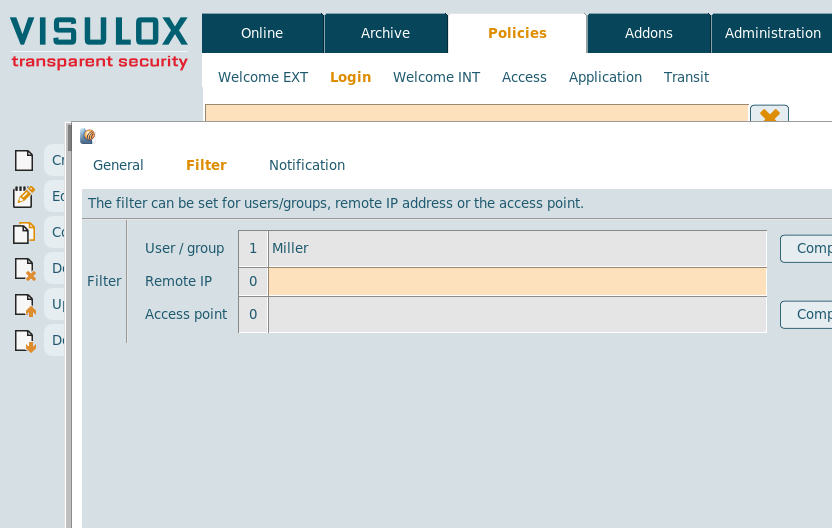
Filter is set to "Miller" for all examples.
Additional filters can be set based on the Remote IP address or on the access point and a login limit can be set (not used in this example).
Selecting the PIN script:
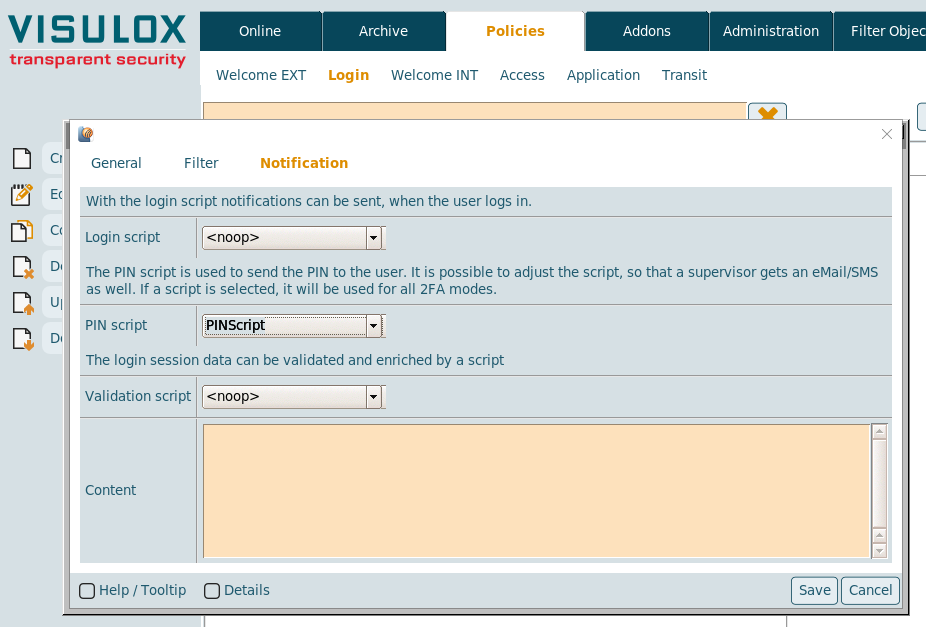
With the Login script, notifications can be sent to the supervisor (Not used in this example).
The created script ("PINScript") should be used to send the PIN notification to user Miller.
User Miller logs into VISULOX PORTAL with 2FA active - eMail with Access PIN is sent to Miller:
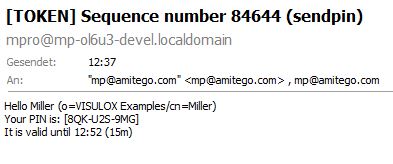
The eMail with the Access PIN is sent to the eMail address of user Miller, that is registered in VISULOX PORTAL.
The displayed information is based on the created script ("PINScript") in the first step.
Notifications check list and additional tests
| Feature | Expected behaviour | Comment |
|---|---|---|
| Policy mode: disabled |
| |
Filter settings (Depending on the notification) |
| |
| Notifications |
| |
| Scripts |
| |
| Script variables |
|