
Automated transfer of files into Transit Zone (Passon)
Overview
Users are able to upload into the Transit Zone. Depending on the user, file name or file type The configuration is easily done in VISULOX Cockpit / Policies / Transit Policy. The passon script used for the automated transfer can be created or adjusted in |

Upload
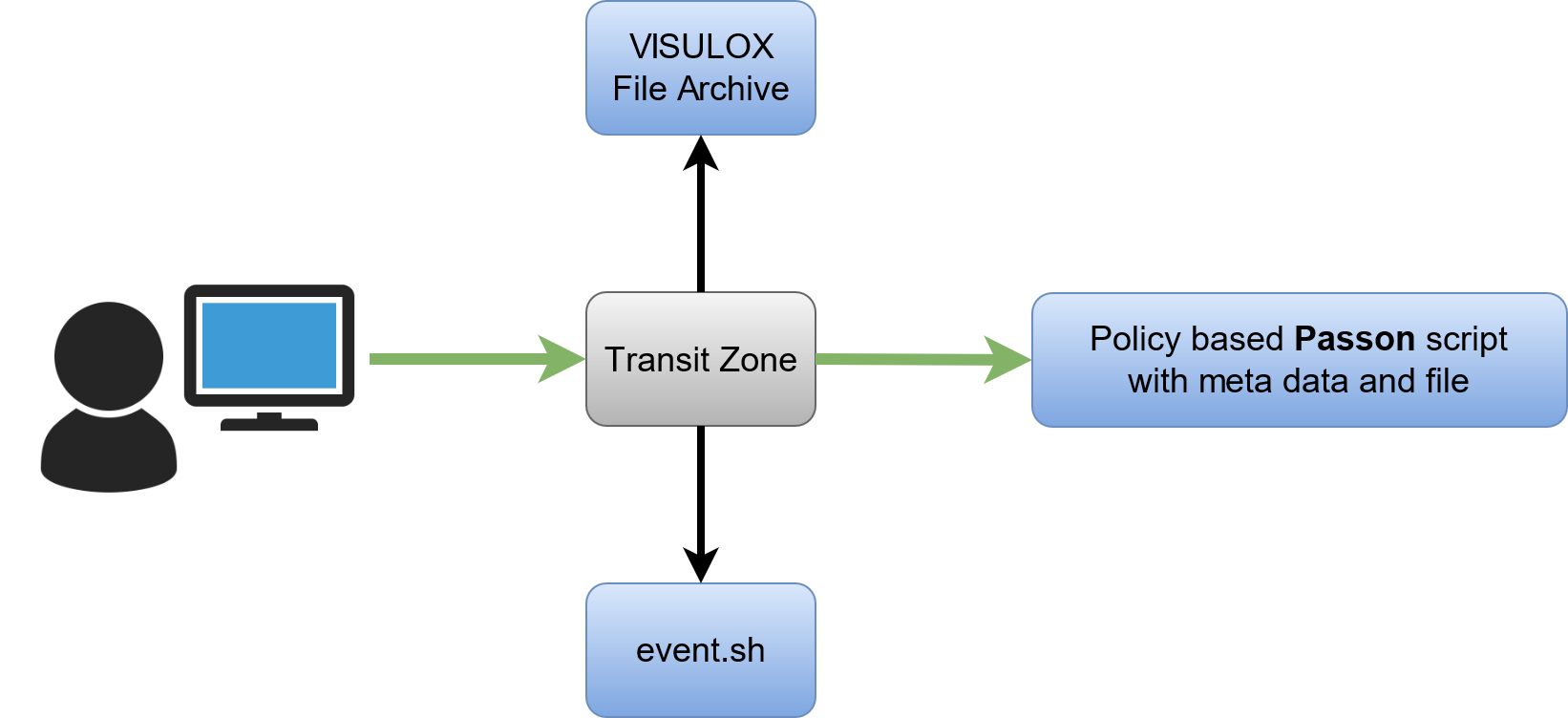
Download
Create a passon example script
Using the CLI a passon example script can be implemented with the following steps.
- Create a file with the example script (see below)
Use the following command to implement the script for the Transit Policies:
Setup script
CODEvisulox admin action add -name passon -category validate -scriptfile /tmp/passon.shThe passon script now is displayed in VISULOX Cockpit / Administration / Actions and can be used in the Transit Policies
Example script: passon.sh
#!/bin/bash
# VLXOBJECT = Originale filename
# VLXFILEPATH = Path to file on disk (no not delete within script)
$VLXPATH/bin/cmd/config.tcl env > /tmp/passon.$$
cp $VLXFILEPATH /tmp/${VLXLOGINUSER}-${VLXCREATETIME}-$VLXOBJECT
echo "done with $VLXOBJECT"
# If the script should be treated as successful in VISULOX, the exit code must be 0
true
exit $?
In this example script the file will be copied to /tmp (the available variables will be dumped to a file in /tmp as well).
The login user name and the timestamp will be added to the filename.
Most important variables within the script
        VLXFILEPATH = /opt/visulox/var/filearea/upload/81e77f1e-b8d1-4004-96dd-f87d85b18b32
          VLXOBJECT = Hydrangeas.jpg
           VLXOWNER = o=Tarantella System Objects/cn=Miller
File:  %VLXFILENAME%
Sign:  %VLXFILETYPE%
Size:  %VLXFILESIZE_FMT%
Hashs: %VLXFILEHASHS%
Additional variables that can be used in the script
     VLXACCESSPOINT = example.domain.com
	    VLXCLIENTIP = 192.168.1.123
      VLXCREATETIME = 1538735003
    VLXCREATETIMEMS = 1538735003717
VLXCREATETIMEMS_FMT = 2018-10-05 12:23:23.717
  VLXCREATETIME_FMT = 2018-10-05 12:23:23
       VLXEVENTINFO = POL-FT Filetype: JPEG image data, JFIF standard 1.02 Size:581.33kB
        VLXFULLNAME = Miller
       VLXGROUPLIST = {o=Tarantella System Objects/cn=Miller}
   VLXGROUPLIST_FMT = Worker
            VLXLANG = en
             VLXLOG = /opt/visulox/var/log
       VLXLOGINUSER = Miller
         VLXOWNERID = 6F69AFA4EFD0B379724F330FCB81A65C
      VLXOWNERSHORT = Miller
            VLXPATH = /opt/visulox
          VLXPOLICY = POL-FT
      VLXPOLICYMODE = passedon
        VLXREMOTEIP = 192.168.1.123
 	  VLXREPOSITORY = DATASTORE
     VLXSESSIONHOST = vEXAMPLE
         VLXSURNAME = Miller
       VLXTOKENMODE = NONE
     VLXUSERPROFILE = o=Tarantella System Objects/cn=Miller
VLXUSERPROFILESHORT = Miller
            VLXUTIL = /opt/visulox/lib/utils
      VLXWEBTOPBASE = https://example.domain.com:443/sgd
Passon approved variables
  VLXAPPROVALMODE = approved
    VLXAPPROVEDBY = CN=Tom Meyer,OU=Mitarbeiter,OU=ToolBox,DC=tbsol,DC=de
VLXAPPROVEDBY_FMT = Tom Meyer
    VLXCREATETIME = 1591725677
VLXCREATETIME_FMT = 2020-06-09 20:01:17
         VLXEVENT = approved
     VLXEVENTINFO = File is requested by support.
      VLXFILEPATH = /tmp/vlx.dump
     VLXGROUPLIST = o=organization/cn=foo
 VLXGROUPLIST_FMT = foo
           VLXLOG = /globalhome/tbasien/vsx30/var/tab-dev1/log
        VLXOBJECT = data_ok.png
         VLXOWNER = o=organization/cn=foo
    VLXOWNERSHORT = foo
          VLXPATH = /globalhome/tbasien/vsx30
        VLXPOLICY = PASSON
      VLXREMOTEIP = 192.168.3.166
          VLXUTIL = /globalhome/tmeyer/vsx30/lib/utils
Passon rejected variables
  VLXAPPROVALMODE = rejected
    VLXAPPROVEDBY = CN=Tom Meyer,OU=Mitarbeiter,OU=ToolBox,DC=tbsol,DC=de
VLXAPPROVEDBY_FMT = Tom Meyer
    VLXCREATETIME = 1591725924
VLXCREATETIME_FMT = 2020-06-09 20:05:24
         VLXEVENT = rejected
     VLXEVENTINFO = Rejected because project is freezed.
      VLXFILEPATH = /tmp/vlx.dump
     VLXGROUPLIST = o=organization/cn=foo
 VLXGROUPLIST_FMT = foo
           VLXLOG = /globalhome/tbasien/vsx30/var/tab-dev1/log
        VLXOBJECT = data_ok.png
         VLXOWNER = o=organization/cn=foo
    VLXOWNERSHORT = foo
          VLXPATH = /globalhome/tbasien/vsx30
        VLXPOLICY = PASSON
      VLXREMOTEIP = 192.168.3.166
          VLXUTIL = /globalhome/tmeyer/vsx30/lib/utils
Configuration of a passon Transit Policy
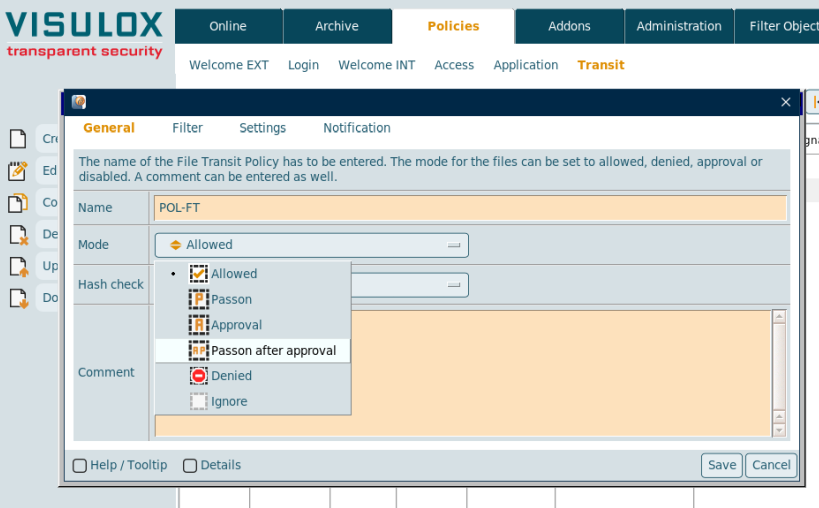
In VISULOX Cockpit / Policies / Transit Policy a new policy has to be created.
Select policy mode Passon or Passed on after approval:
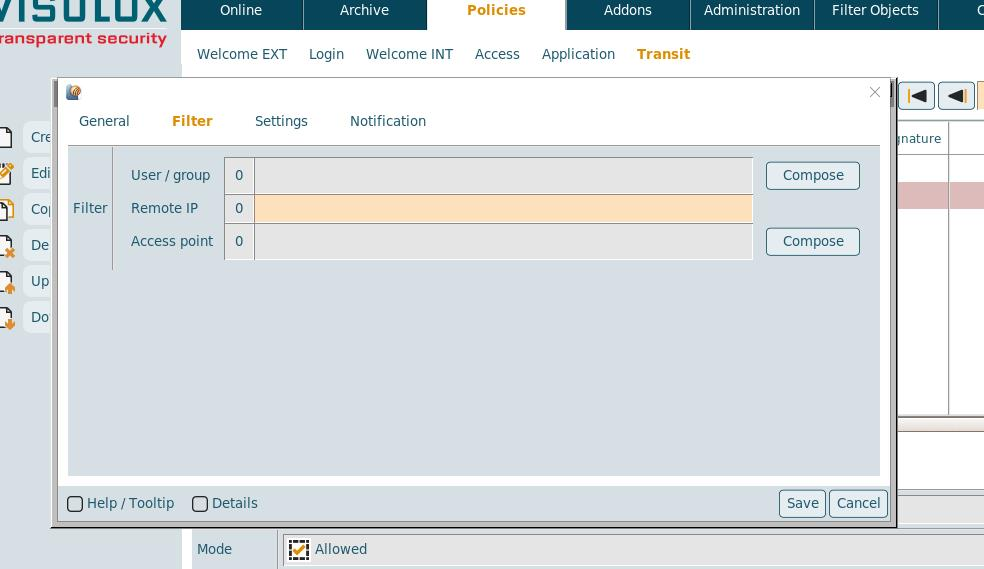
Set the Transit Policy filter for user / group and/or access point:
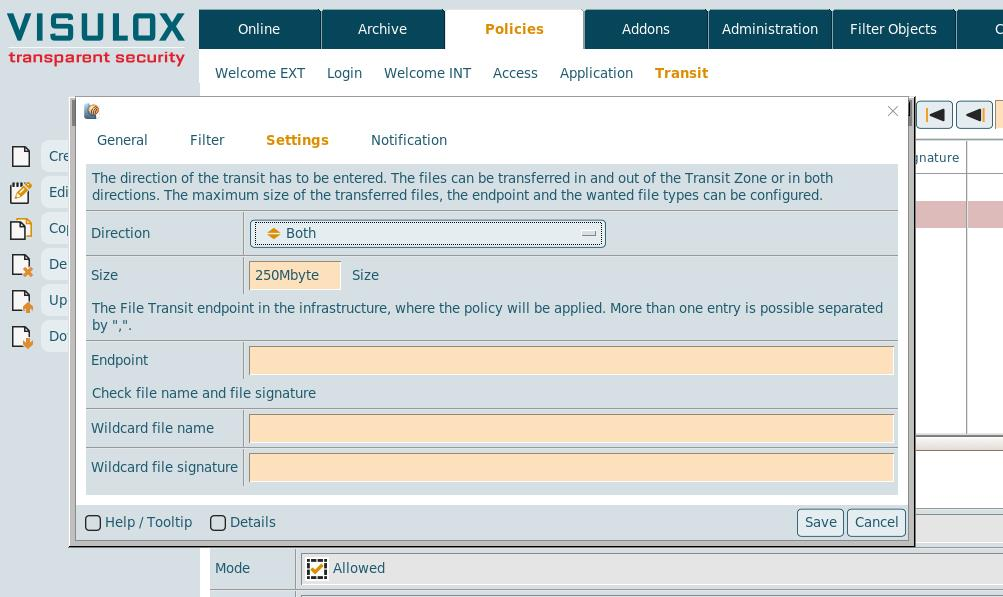
Enter filename and/or filetype of the files, that will be passed on (wildcards are possible):
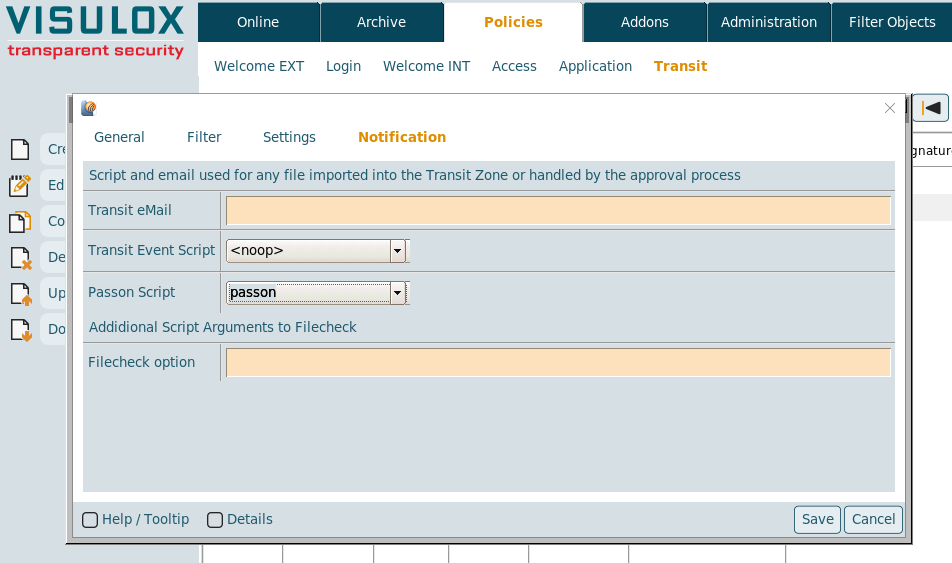
Select the Passon event script:

A file that is uploaded via Passon Policy is shown in the Transit Zone. It can not be downloaded with VLX Transit Web or VISULOX File Exchange.
→ passon enforces direction: in
Files transferred via Passed on with approval have to be approved or rejected by a supervisor in VISULOX Cockpit / Online / Transit Zone. Approval is done and processed on the server of the supervisor!
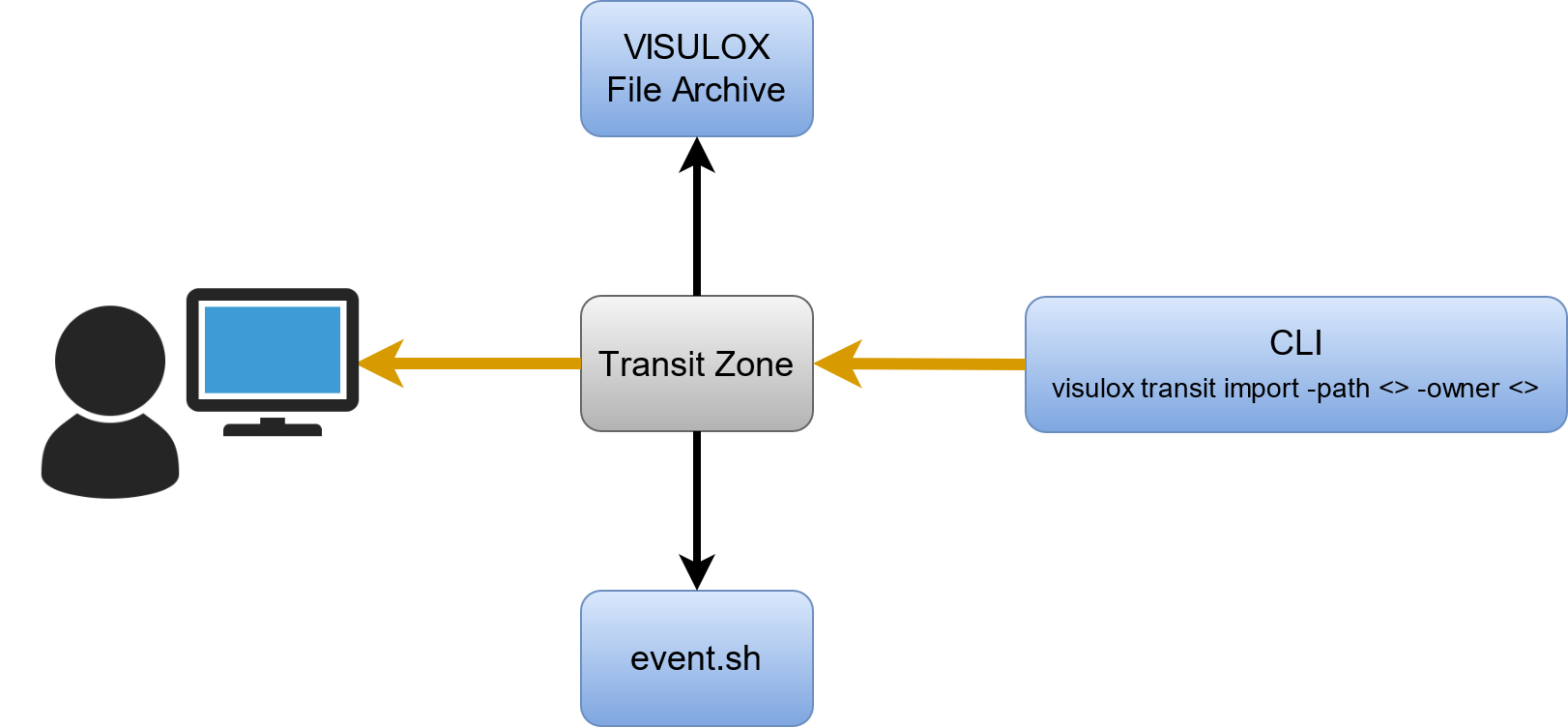
Command Line Interface
The visulox transit command can be used to copy files into the Transit Zone of another user. A standard Transit Policy is applied.
Available commands and their options
| approval | Approve or reject pending files in Transit Zone
|
| import | Import file into a users Transit Zone
|
| list | List user's with files in the Transit Zones |
| delete | Delete files in Transit Zone
|
Example to import a file for download into the Transit Zone
visulox transit import -path <path to file> -owner <unique owner> -rtime <retention time in sec>- Import command needs a standard Transit Policiy with the direction both or out, size, pattern, etc.
- The retention time maximum is limited to the lifetime in archive