
VISULOX Firefox Wrapper setup
Prerequisites
Installation of required libraries:
yum install libstdc++.i686 freetype.i686 fontconfig.i686 libXrender.i686 libXext.i686 libXdamage.i686 libXcomposite.i686 alsa-lib.i686 dbus-glib.i686 gtk2.i686 libXt.i686 gtk2.x86_64Firefox Wrapper setup
There are several steps to get the Firefox Wrapper running.
- Provide the Firefox Wrapper library into the user context
- Provide the Firefox versions needed for the setup
- Provide Flash
- Provide JAVA

32bit versions are needed for this setup.

The package has to be extracted to $VLXDIR/tools/ffw/.
All setup scripts can be found in $VLXDIR/tools/ffw/setup.
Install Firefox Wrapper
sh installFirefoxWrapper.shProvide Firefox versions
The script installFirefoxVersions.sh will download and extract the Firefox versions (if necessary).
The Firefox versions are stored in
/opt/ffw/firefoxThe file pathsAndVars.sh has the list of Firefox versions provided by the Firefox Wrapper. The list has a "name" and the URL to the Firefox versions repository.
The "name" prefix is the architecture.
FXLIST+="36_32bit $FXRELEASE/36.0/linux-i686/en-GB/firefox-36.0.tar.bz2;"
FXLIST+="36_64bit $FXRELEASE/36.0/linux-x86_64/en-GB/firefox-36.0.tar.bz2;"
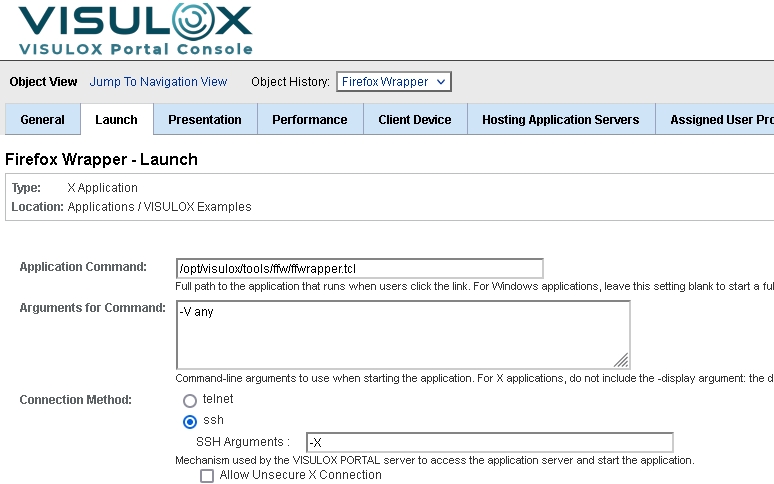
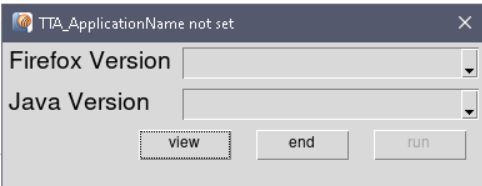
A selection window can be displayed on Firefox Wrapper start with the following Arguments for Command:
Configuration | Selection on application start |
|
|
Useful arguments
| Arguments | Description |
|---|---|
| -V <arg> | Select Firefox Version. If 'any', user has to select the version. OS uses the platform Firefox. Default: OS |
| -java <arg> | Requested Java Version |
| -drive <arg> | Drive name in Citrix session for vlxtransit. Default: E |
| -path <arg> | Path to Firefox Wrapper Files. Default: $FXBASE |
| -allowedSites <arg> | List of allowedSides in Firefox profile |
| -bwrap <arg> | Bubblewrap-specific options <> |
| -E <arg> | Extension list for Firefox |
| -debug | No auto close |
Adding a new version
To add a new Firefox version, edit $VLXBASEPATH/tools/ffw/pathsAndVars.sh .
Adding a new Firefox version
FXLIST+="<version> $FXRELEASE/<url to version>;"
Example - Firefox 45
FXLIST+="45_64bit $FXRELEASE/45.0/linux-x86_64/en-US/firefox-45.0.tar.bz2;"After adding new versions, redo the steps of the installation
If the Firefox versions can not be downloaded by the installation script, a manual download is needed from the Firefox version repository:
https://ftp.mozilla.org/pub/firefox/releasesProvide Flash
The script installFlash.sh puts the the flash plugin into place. The flash plugin is addressed by all Firefox versions.
Flashplugin
/opt/ffw/flashProvide Java versions
The Firefox Wrapper can assign different Java versions as well.
The Java versions are extracted and installed as RPMS with installJavaPlugin.sh.
JAVA plugins
/opt/ffw/javaPrevious Java versions can be downloaded from:
http://www.oracle.com/technetwork/java/archive-139210.htmlFirefox Wrapper sandbox
Firefox Wrapper can be adjusted to restrict the access of the users.
The user is able to see only his own files.
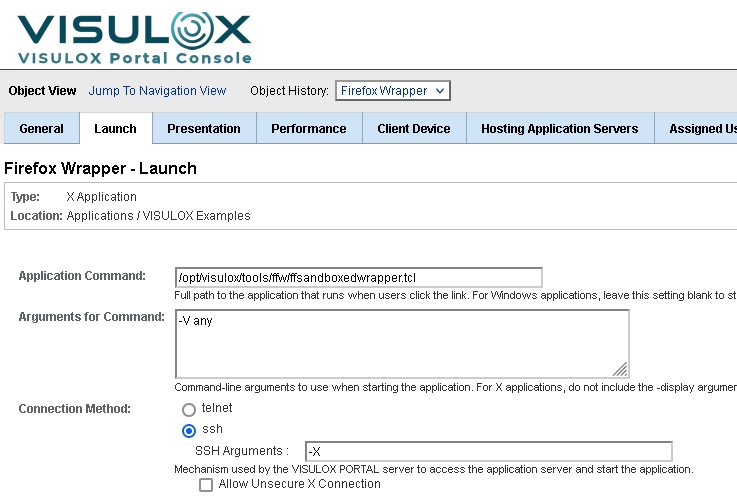
Use the following configuration for a Firefox Wrapper sandbox application:
Allowed sites for add-ons / plugins
For vlxshell and ffwrapper the Firefox allowedSite database can be preset during startup.
The parameter is -allowedSItes, the arguments are comma separated URLs, which will be trusted. Multiple URLs can be added.
This allows to specify websites, that are allowed to install add-ons and plugins without a warning.
Update
Ater updating VISULOX the script has to be run manually again
$VLXDIR/tools/ffw/setup/installFirefoxWrapper.sh
Check the file permissions! Files must be readable by vlx user.