
How to control the VISULOX Cockpit
Controlling the VISULOX Cockpit
The VISULOX Cockpit is provided as a resumable and uncontrolled application as default.
This means, vlxMode=NOSC is set and the usage of the Cockpit cannot be restricted by an Access or Application Policy.
In general a recording of the Cockpit is not needed or does not make sense.
In contrast the access to the the Cockpit has to be under control, based on the Company's Security Rules, i.e. usage in Dual Control mode, usage from a dedicated remote IP or over a dedicated access point.
To achieve this, the VISULOX Cockpit has to be enabled for session control.

Remove vlxMode=NOSC from the application in the datastore.
Now all Access and Application Policies will be applied.
VISULOX Cockpit / vlxgui parameters
| Parameter | Description |
|---|---|
| -title <value> | GUI title <> |
| -lang <value> | Language <> |
| -roles <value> | Role or role list. Default: <@ADMIN> |
| -grant <value> | Override the granting user <> |
| -groupaccess <value> | Access Profile for Group Access Manager <> |
| -project | Enable Project Access Manager |
| -projectmask <value> | Project mask (only with -project). Default: <*> |
| -ksr | Enforce displaying keyboard input lines in @ADMIN role |
| -kiosk | Use the whole screen |
| -personal | Use vlxgui in personal mode. The user's data only |
| -approver <value> | eMail of Approver: SESSION, REQUEST or ANY for request via GUI NONE: No approver. Cookpit user can approve all |
-sendlink <value> | Provide Checkout link via email to ZIP of files |
See also: How to handle access for groups / Restrict default VISULOX Cockpit / How to configure role profiles for the VISULOX Cockpit
Starting VISULOX Cockpit with parameter -grant
All changes done in the Cockpit will be registered under the name of the user, who has started the Cockpit session.
If it is wanted, that certain changes are registered under another name (e.g. Supervisor, System, etc), this can be done with the -grant parameter in the "Arguments for Command" field of the application definition:
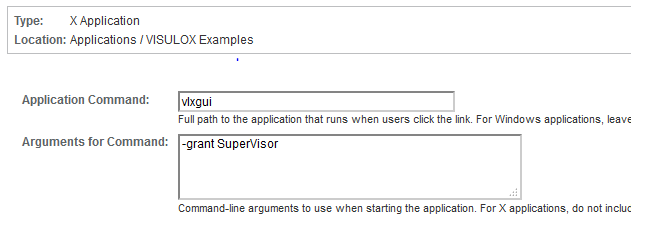
This vlxgui parameter will override all created_by and updated_by entries.
Changing the number of the displayed entries per page
visulox config -name guidefaults.sql.pager
    ---------------------------------------------------
    | changed | key                   | value         |
    ---------------------------------------------------
    |         | guidefaults.sql.pager | 50:75:100:250 |
    ---------------------------------------------------