
Recorder configuration
Configuration parameters
visulox config list -name recorder
    -------------------------------------------------------------------------------------------------
    | changed | key                       | value                                                   |
    -------------------------------------------------------------------------------------------------
    |         | recorder.auto_acknowledge | 0                                                       |
    |         | recorder.chapterinterval  | 20                                                      |
    |         | recorder.manually         | true                                                    |
    |         | recorder.max              | 250                                                     |
    |         | recorder.snapshotinterval | 5                                                       |
    |         | recorder.welcome          | Security Policy enforces recording for this application |
    -------------------------------------------------------------------------------------------------
Auto acknowledge recording
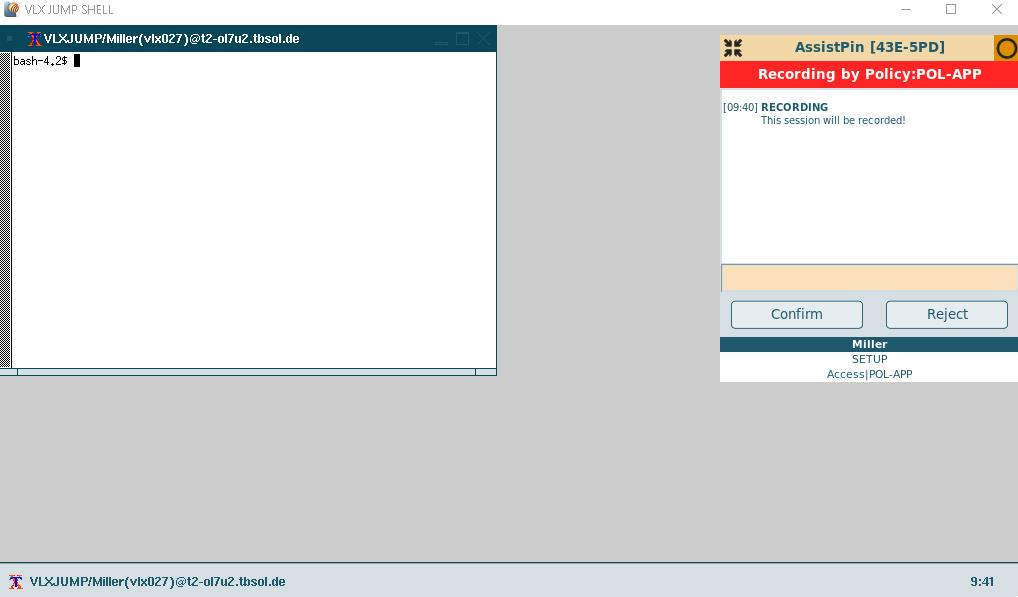
With this setting, the behaviour of the recording box can be configured.
| auto_acknowledge | Description |
|---|---|
| 0 | Recording dialog stays on the screen, until confirmed or rejected by the user. |
| 1 | The positive value is the time in seconds until the recording dialog is confirmed. |
| -1 | The negative value is the time in seconds until the recording dialog is rejected. |

Negative integer values are supported since version 3.1.7p2 for new installations.
Older or updated versions need a correction via database on each node:
visulox database query -sql "update  global_layout SET value=-5 where name='auto_acknowledge'" -force
visulox config rebuild
Disable manual recording
The manual recording checkbox in the control panel can be removed to prevent users recording their own sessions.
|
Chapter / frame settings
| Parameter | Description |
|---|---|
| chapterinterval | Chapterinterval in minutes. The default setting is 20 min for a chapter. |
| framerate | Framrate in frames per second. The default framerate is set to 10 frames per seconds. Higher values will have an impact on the performance. |
| snapshotinterval | Snapshotinterval in minutes. Default setting: a snapshot is taken every 5 minutes. |