
Object ID
Every user has an owner name and additionally an object ID, which is the hash value of the owner name.
Whenever a command is referencing the owner, it is a good idea to use the object ID, which has no difficulties interpreting special characters.
An object ID based on a hash value is available for owner, application and application group.
The object ID is displayed
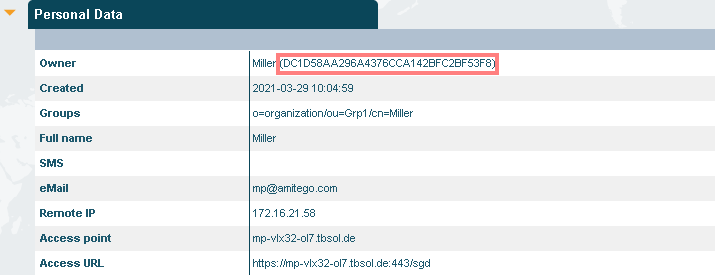
- in the Workspace / Personal Data section of the user:
- in Cockpit / Filter Objects for administrators, e.g. object ID of the owner:
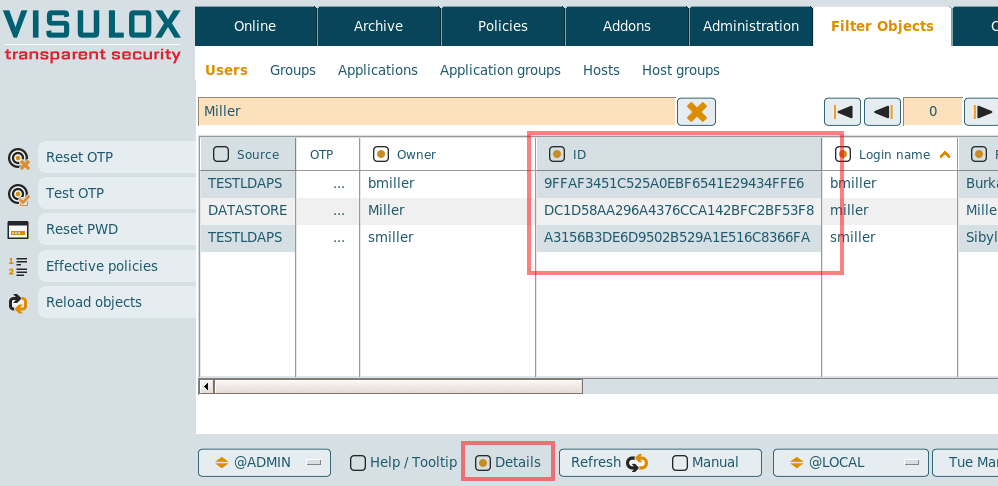
Details must be enabled to display the column with the object ID.
Examples, where the object ID can be used:
CODE
visulox policy application add -name test -object 5F7AB10DADC9EDA6EE7D2034B5545E18

visulox otp set -object 5F7AB10DADC9EDA6EE7D2034B5545E18 -otp 460136 -key Y2HLYFMPI44EDK3X

visulox passcache edit -resource Test -object 5F7AB10DADC9EDA6EE7D2034B5545E18 -resuser root -respass -

visulox admin cockpit  add -template @VIEW -object 5F7AB10DADC9EDA6EE7D2034B5545E18 -name Test

...