Login check against an external system
AboutAdditional fields and tooltips can be added to the login page. VISULOX is able to validate these fields and provides an interface e.g. to an external ticket system. The design of the scripts depends on the interface to the external system. Other VISULOX login authentication mechanisms (e.g. MFA, verbal, etc) can be used additionally.
An MFA License is required to use the login check against an external system feature.
|

Interface to the external system
Ticket validation
The VISULOX Login Policy is extended to use a check script. The interface to the script provides the following VISULOX internal data:
- VLXOWNER (the used account)
- VLXTICKETID (which is the user provided ticket)
- other VLX parameters
The script talks to the external system and gets a feedback.
The check / validation script can be added to the VISULOX action scripts with:
visulox admin action add -name CHECK -scriptfile <checkscript.sh> -force -category validateOnce the script is added, it can be selected in Login Policy / Notification / Validation Script.
Ticket update
The interface to the script provides the following VISULOX internal data:
- VLXOWNER (the used account)
- VLXTICKETID (which is already validated)
- other VLX parameters
The update / notification script can be added to the VISULOX action scripts with:
visulox admin action add -name UPDATE -scriptfile <update-script.sh> -force -category loginOnce the script is added, it can be selected in Login Policy / Notification / Notification Script.
New available interface of the MFA shell script
The redesigned script needs a base64 string with the return code <VLX ERROR CODE> info <info> data <data>.
With scriptAnswer.tcl the return string can be easily created within the shell script.
This applies also to confirmStatus.tcl (built-in).
External MFA has the following sequences:
For evaluation in the script VLXMFATOKEN (provided by the user after MFAREQUST) and VLXMFADATA (provided by the external service as token/session info) is available.
VLXMFATOKEN is always empty for the first time. After one init cycle the answer VLXMFADATA (-data) is returned.
VLXMFATOKEN always has a value from the VLXREQUEST cycle.
- MFAWAIT (Another init cycle occurs)
- MFAREQUEST (User provides value, that will be in VLXMFATOKEN)
- MFADENY (Rejected)
- SUCCESS (Successful, next)
Program for testing:CODE#!/bin/bash # verify helpful lines #exec 19> /tmp/apiExternalPinScript.log #BASH_XTRACEFD=19 #set -x # VLXMFATOKEN - provided by user from MFA EXTERNAL PAGE # VLXMFADATA - provided by backend / can be set by answer to backend # exitcode 0: script run without error # any other exitcode: script error # The internal answer is converted using scriptAnswer.tcl # Example with pin request: examplePinRequest () { noteData="(has <${VLXMFADATA}>)" note="0000=WAIT / 5678=REQUEST / 1234=OK / other=DENY / ${noteData}" if [[ "$VLXMFATOKEN" = "" ]] then # create session / init a session sessionData=SD$$ $VLXUTIL/scriptAnswer.tcl -format base64 -code MFAREQUEST -info "$note / (init <${sessionData}>)" -data "$sessionData" elif [[ "$VLXMFATOKEN" = "0000" ]] then $VLXUTIL/scriptAnswer.tcl -format base64 -code MFAWAIT -info "$note" -data "$VLXMFADATA" elif [[ "$VLXMFATOKEN" = "5678" ]] then $VLXUTIL/scriptAnswer.tcl -format base64 -code MFAREQUEST -info "$note" -data "$VLXMFADATA" elif [[ "$VLXMFATOKEN" = "1234" ]] then $VLXUTIL/scriptAnswer.tcl -format base64 -code SUCCESS -info "OK / ${noteData}" else $VLXUTIL/scriptAnswer.tcl -format base64 -code MFADENY -info "Your request was denied / ${noteData}" fi } # $VLXUTIL/rsasecureid test -resource rsaUrl.tcl ... examplePinRequest exit $?
Additional fields and tooltips on login page
Additional fields and tooltips
visulox config -name extendsession
    --------------------------------------------------------
    | changed | key                                | value |
    --------------------------------------------------------
    |         | extendsession.login.entry1         |       |
    |         | extendsession.login.entry1.usertip |       |
    |         | extendsession.login.entry2         |       |
    |         | extendsession.login.entry2.usertip |       |
    |         | extendsession.login.entry3         |       |
    |         | extendsession.login.entry3.usertip |       |
    |         | extendsession.scx.entry1           |       |
    |         | extendsession.scx.entry1.usertip   |       |
    |         | extendsession.scx.entry2           |       |
    |         | extendsession.scx.entry2.usertip   |       |
    |         | extendsession.scx.entry3           |       |
    |         | extendsession.scx.entry3.usertip   |       |
--------------------------------------------------------extendsession.scx entries belong to information on application start, which can also be used to send updates to the external system.
For example
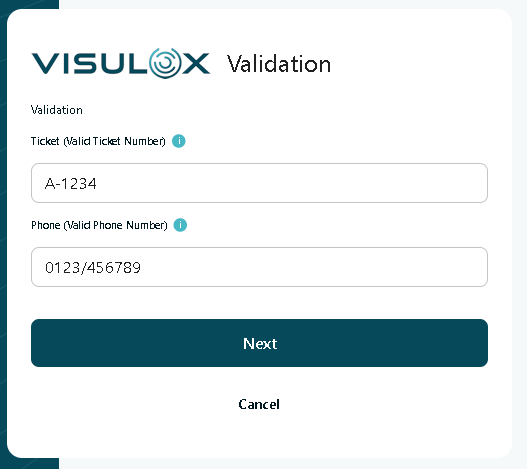
visulox config -name extendsession.login.entry1="Ticket (Valid Ticket Number)"
visulox config -name extendsession.login.entry1.usertip="Registered users have to provide a valid ticket number."

visulox config -name extendsession.login.entry2="Phone (Valid Phone Number)"
visulox config -name extendsession.login.entry2.usertip="Users can leave this empty."

visulox portal attach -jspconf
With these configuration settings the following login mask is displayed after the initial login: